


CodeforcesSync: Automatically Sync Your Accepted Submissions to GitHub!
Hello Codeforces community!
As competitive programmers, we spend countless hours solving problems, debugging, and getting those glorious Green ACs. But keeping our GitHub profiles active and archiving our solutions manually can be a tedious chore. Most of us simply forget to maintain a repository for our CP journey.
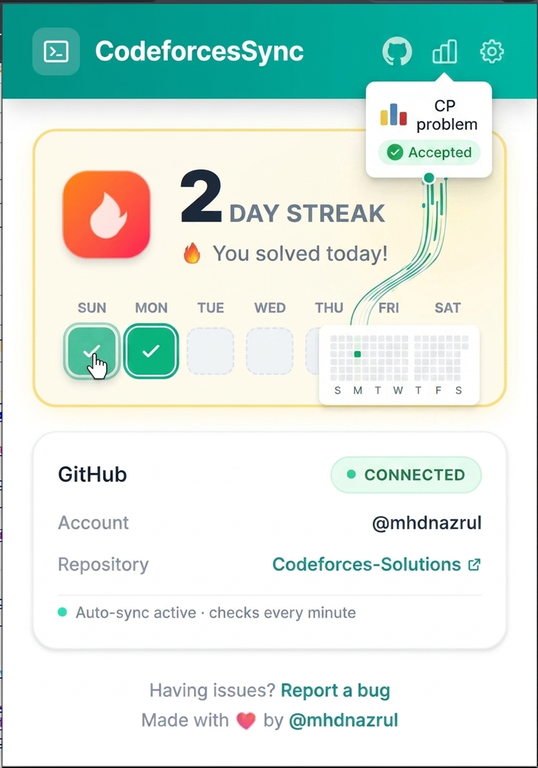
To solve this permanently, I created CodeforcesSync -- an open-source Chrome extension that automatically detects your Accepted (AC) submissions in real-time and pushes them to your GitHub repository instantly.
Why use CodeforcesSync?
- Keep Your GitHub Green: Every time you solve a problem on Codeforces, your GitHub contribution streak automatically grows.
- Beautifully Organized Repo: Solutions are saved with clean, descriptive names based on problem codes and titles (e.g., 1866A_Ambitious_Kid.cpp, 4A_Watermelon.py). It automatically detects languages like C++, Python, Java, etc.
- Full Coverage: It works perfectly for Contests, Gyms, Problemsets, and Groups submissions.
- Zero Overhead: Just solve problems like you normally do. The extension handles everything in the background.
Security and Privacy First
I know what you are thinking: "Is it safe to provide my GitHub Personal Access Token?"
Yes, 100 percent. * The project is entirely open-source; you can inspect every single line of code in the repository. * Your Personal Access Token and data are stored safely inside your browser's local storage (chrome.storage.local). * No third-party servers or external APIs are involved. Your credentials never leave your machine.
Quick 30-Second Installation
Since publishing on the Chrome Web Store requires a fee, you can easily load it locally in less than a minute:
- Download the latest release ZIP file directly from here: Download CodeforcesSync v1.4.0
- Extract the downloaded ZIP file onto your computer.
- Open Google Chrome and navigate to chrome://extensions/
- Enable Developer Mode (toggle switch in the top-right corner).
- Click on the "Load unpacked" button (top-left) and select the extracted folder.
And that's it! The extension is ready to use.
Setup Configuration
- Click on the extension icon in your browser toolbar to open the popup.
- Fill in the following details:
- GitHub Username
- GitHub Personal Access Token (with "repo" scope permission so it can push your code)
- Target Repository Name (Create a new repo on GitHub first, e.g., Codeforces-Solutions)
- Codeforces Handle
- Click Save.
Note: Just keep a Codeforces tab open while you are solving. As soon as the system verdict changes to Accepted, your solution will be automatically pushed to your repo!
Support and Feedback
This project is built using TypeScript with love for the CP community. If you find this tool helpful, please consider leaving a star on the repository. It helps the project grow and motivates me to add more features!
Link to GitHub Repository: mhdnazrul/CodeforcesSync
If you encounter any bugs or have feature suggestions (like adding runtime/memory stats in the commit message), feel free to open an issue on GitHub or drop a comment below!
Happy Coding!


does it push your submission while the contest is happening? bcs if it does, it's against the rules and you could be banned for it.
Don't worry, it does not violate any Codeforces rules!
During a live contest, Codeforces restricts/changes certain API behaviors, so the extension cannot immediately push the code. Instead, it safely queues up your Accepted submissions. Once the contest ends and the Codeforces API returns to normal, the extension automatically processes the queue and syncs the solutions.
So you are completely safe from being banned.
is there any extension for firefox
and will this also sync previous accepted solutions
"and will this also sync previous accepted solutions"
Actually, it can sync your recent past solutions! In my testing, it successfully synced problems solved a couple of days ago. (1/2 month)
However, I haven't fully tested it for very old submissions (like 10 month or 1,2 year ago), so I cannot guarantee if it will fetch your entire historical data. It is primarily designed to work seamlessly in real-time for all your new submissions from the moment you install it.
You can definitely give it a try and see how far back it fetches your solutions!
Currently, CodeforcesSync is only supported and tested on Google Chrome (and other Chromium-based browsers like Brave or Edge).
While Firefox does have a debugging mode for temporary extensions, Chrome and Firefox handle browser extension APIs a bit differently, so it won't work out of the box right now. However, bringing Firefox support is definitely on my radar for future updates!
great work bro , btw for queue what did u used kafka or rabbitmq ? and also for this extension whats the tech stack
Thanks man!
Actually, since this is a client-side Chrome extension, there are no heavy server-side message brokers like Kafka or RabbitMQ involved. The queuing mechanism is handled completely on the client side using a simple in-memory JavaScript/TypeScript queue system. If a push fails or is restricted by the API during a contest, the extension retains the state and retries once the system is stable.
As for the tech stack, it is built with:
No third-party servers are used, making it lightweight and secure!
In the repo said to use
npmto and upload thedistfolder in chrome. I did it but the extensions was not working. Meaning it was not synced with my CF account while I was filled all the settings and also it was not pushing any submissions to my git repo linked here.Will that push solutions to repo if I make it private? I set the access token to access pv repos too
Thanks for trying it out and reporting this! Here are the answers to your queries:
npm installnpm run buildRegarding the extension not syncing: If you are building the project manually from the source using npm, it might sometimes run into minor build or configuration artifact issues. To fix this easily, I highly recommend downloading the pre-compiled production ZIP directly from the GitHub Releases section and loading that extracted folder instead. Also, please make sure to refresh your active Codeforces tabs after saving your settings so the extension's scripts can inject properly and start tracking.
Regarding Private Repositories: Yes, absolutely! It works perfectly with private repositories. Since you have already configured your Personal Access Token with the correct scope to access private repos (the
reposcope), it will securely sync your solutions without any issues. In fact, keeping the repository private is the highly recommended way to use this tool!Give the release version a shot and let me know if it solves the problem for you!
Thank you too much. It is working so good.
You're very welcome!
If you encounter any bugs or have cool feature ideas in the future, feel free to open an issue on GitHub or drop a comment here.
Happy coding!
how is it supposed to work? it keeps on opening submission page in browser, but i can't see anything getting pushed to my github.
Hi! The extension checks your submission page periodically in the background to detect new Accepted (AC) verdicts. However, if it's opening the page but nothing is getting pushed to GitHub, it is usually due to a configuration or authentication error.
Please double-check the following steps to fix this:
reposcope checked when you generated it. Without this permission, the extension cannot write/push code to your repository.Codeforces-Solutions). Also, ensure you have already created that repository on your GitHub account.If you've verified all three and it still doesn't push, try downloading the pre-built ZIP from the GitHub Releases section instead of compiling it manually. Let me know if this solves it!
Better option version 2.3.2. I already upgraded the setup systems. repo link new version link
will it work only for a new repository? can i use it in a existing repository with few items? will it create a README file too, for maintaining list of problems like some leetcode extensions do?
Great questions!
Existing Repository Support: Yes, absolutely! You can use it with an existing repository that already contains other files or projects. The extension will not overwrite or delete your existing items; it will simply create or push the new problem files (
.cpp,.py, etc.) into that repository.README Generation Feature: Currently, the extension focuses on syncing the individual solution files to your repository in real-time. It does not automatically generate or update a central
README.mdfile with a list or table of all solved problems yet. However, this is an excellent feature idea (similar to LeetCode extensions), and I am adding it to the roadmap for the upcoming updates!If you would like to contribute by creating a
README.mdfile, you are most welcome.Thank you for the feedback, and feel free to suggest more features!
are you planning on adding support for firefox in the future? if you ever do please reply to this. good work