


CodeforcesSync: Automatically Sync Your Accepted Submissions to GitHub!
Hello Codeforces community!
As competitive programmers, we spend countless hours solving problems, debugging, and getting those glorious Green ACs. But keeping our GitHub profiles active and archiving our solutions manually can be a tedious chore. Most of us simply forget to maintain a repository for our CP journey.
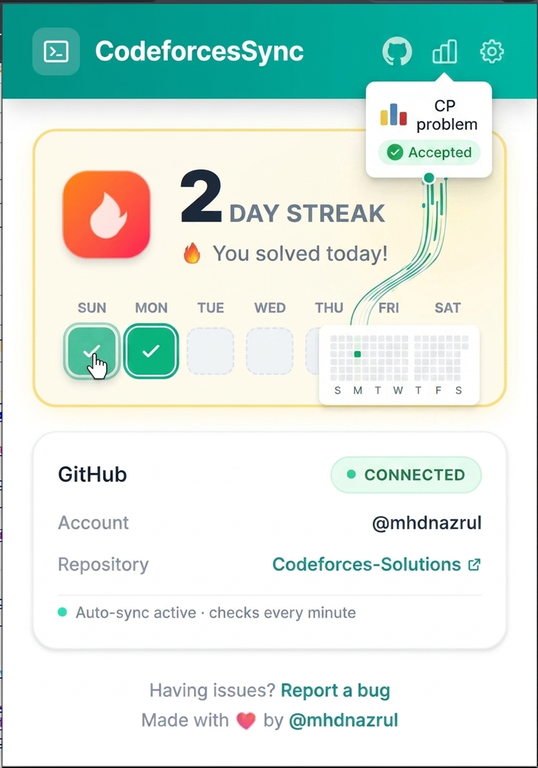
To solve this permanently, I created CodeforcesSync -- an open-source Chrome extension that automatically detects your Accepted (AC) submissions in real-time and pushes them to your GitHub repository instantly.
Why use CodeforcesSync?
- Keep Your GitHub Green: Every time you solve a problem on Codeforces, your GitHub contribution streak automatically grows.
- Beautifully Organized Repo: Solutions are saved with clean, descriptive names based on problem codes and titles (e.g., 1866A_Ambitious_Kid.cpp, 4A_Watermelon.py). It automatically detects languages like C++, Python, Java, etc.
- Full Coverage: It works perfectly for Contests, Gyms, Problemsets, and Groups submissions.
- Zero Overhead: Just solve problems like you normally do. The extension handles everything in the background.
Security and Privacy First
I know what you are thinking: "Is it safe to provide my GitHub Personal Access Token?"
Yes, 100 percent. * The project is entirely open-source; you can inspect every single line of code in the repository. * Your Personal Access Token and data are stored safely inside your browser's local storage (chrome.storage.local). * No third-party servers or external APIs are involved. Your credentials never leave your machine.
Quick 30-Second Installation
Since publishing on the Chrome Web Store requires a fee, you can easily load it locally in less than a minute:
- Download the latest release ZIP file directly from here: Download CodeforcesSync v1.4.0
- Extract the downloaded ZIP file onto your computer.
- Open Google Chrome and navigate to chrome://extensions/
- Enable Developer Mode (toggle switch in the top-right corner).
- Click on the "Load unpacked" button (top-left) and select the extracted folder.
And that's it! The extension is ready to use.
Setup Configuration
- Click on the extension icon in your browser toolbar to open the popup.
- Fill in the following details:
- GitHub Username
- GitHub Personal Access Token (with "repo" scope permission so it can push your code)
- Target Repository Name (Create a new repo on GitHub first, e.g., Codeforces-Solutions)
- Codeforces Handle
- Click Save.
Note: Just keep a Codeforces tab open while you are solving. As soon as the system verdict changes to Accepted, your solution will be automatically pushed to your repo!
Support and Feedback
This project is built using TypeScript with love for the CP community. If you find this tool helpful, please consider leaving a star on the repository. It helps the project grow and motivates me to add more features!
Link to GitHub Repository: mhdnazrul/CodeforcesSync
If you encounter any bugs or have feature suggestions (like adding runtime/memory stats in the commit message), feel free to open an issue on GitHub or drop a comment below!
Happy Coding!


