


Codeforces Lite v1.4.0 — Now with Monaco Editor, Dark Theme Customization, Editor Customization, & More!
Hi everyone! We just crossed 2000+ users and we’re back with another major update!
With dark theme and code runner, we already provided a smoother Codeforces experience, but now, Say hello to Codeforces Lite v1.4.0 — built to give you the best Codeforces experience yet.
What’s New in v1.4.0
Monaco Editor (VS Code Style)
Write code with autocomplete, syntax highlighting, and that familiar VS Code feel — now directly on Codeforces.Multi-Browser Support
Codeforces Lite now works on Chrome, Firefox, and Brave — so you're not limited anymore.Editor Themes & Settings
Pick from 57 themes, customize indent size, line wrapping, minimap, and preview changes live.Dark Theme Customization
Tweak brightness, contrast, sepia, grayscale, and invert — or use our presets to make Codeforces truly yours.Code Formatter
Format your code directly within the extension — no copy-paste, no extra tools needed.
Why Codeforces Lite?
- Customize your dark theme for Codeforces
- Write, run, and judge your code directly in codeforces with VS code editor
- Save your code templates and codes throughout tabs
- Designed for speed, productivity, and smooth contests
We have handled 50,000+ code submissions and maintained a 4.8 star rating, and want you to be a part of us.
Want a new feature? Something bugging you? Drop a suggestion.
Try Codeforces Lite Now
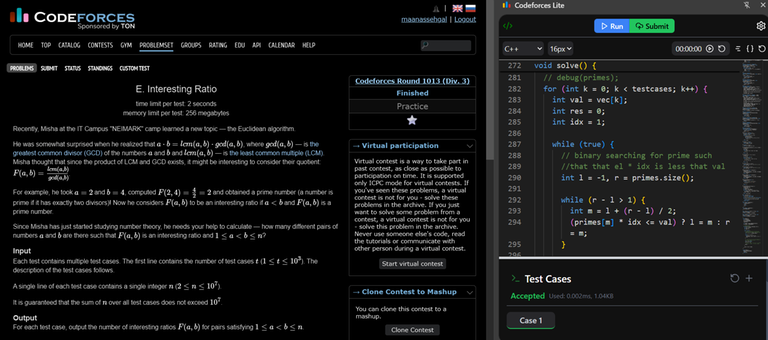


I think writing code with autocomplete is forbidden in contests and also while practicing, so I think it would be better to remove it.
It's not auto complete it's auto suggestions which you get while typing in an editor and it's totally allowed, they just give you syntax and keyword suggestions not the ones which copilot gives. If you don't want to use that as well, you can go to editor settings and disable it :)