




The problem Eitri solves
In competitive programming, the code you write while developing a solution often differs from the code you finally submit. During development, you benefit from a modular codebase: separate files for I/O utilities, graph algorithms, data structures, and other helpers make your work easier to read, test, and reuse. However, most online judges expect a single source file. Manually combining library files, resolving dependencies, maintaining the correct order, and stripping unused code is tedious and error‑prone—especially during a contest when minutes matter.
Beyond library management, competitive programmers face other repetitive tasks: creating a new file for each problem, copying sample test cases whenever the solution changes, hunting through a file picker to open the right source, and repeatedly compiling and testing by hand.
Eitri addresses these pain points by integrating problem intake, file creation, editing, testing, and standalone code generation into a single workflow. It lets you keep a convenient development environment while automatically producing a submission‑ready file when you need it.
Eitri lets you maintain a modular development workflow while generating a standalone source file for submission, with problem intake and testing integrated into the same workflow.
See the workflow before installing anything
Here is what using Eitri feels like, step by step:
Problem intake – You install the Competitive Companion browser extension. When you open a problem on a supported site (Codeforces, AtCoder, CSES, etc.) and click its button, the extension sends the problem’s metadata, constraints, and sample tests to a local HTTP server that Eitri runs on
127.0.0.1:6174.File creation – Eitri receives the problem, selects a filename rule based on the site, and generates a source file in your workspace (e.g.,
src/bin/1234-a.rsfor Codeforces problem 1234A). It populates the file from a template that includes your name, the timestamp, and the problem URL.Editor integration – Eitri opens the generated file in your editor (configured via the
editorfield, e.g.,zed {{ .Filename }}orcode {{ .Filename }}).Development loop – You write your solution, possibly splitting logic across multiple library files (e.g.,
src/lib/cpio.rsfor fast I/O,src/lib/graph.rsfor graph algorithms). Whenever you save the file, Eitri (ifrun_on_saveis true) compiles and runs it against the provided sample tests, showing the results in a split‑pane TUI.Standalone submission – When your solution passes the samples, you press
cin the TUI. Eitri combines your main file with all required library files (resolving dependencies via a regex‑based graph), applies a code‑generation modifier, and copies the resulting single‑file source to your clipboard. You then paste it into the judge’s editor or use an optional companion extension (cp‑submit) to submit directly.Repeat – If you need to adjust the solution, simply edit the file, save, and the test loop runs again. The
cshortcut always reflects the current state.
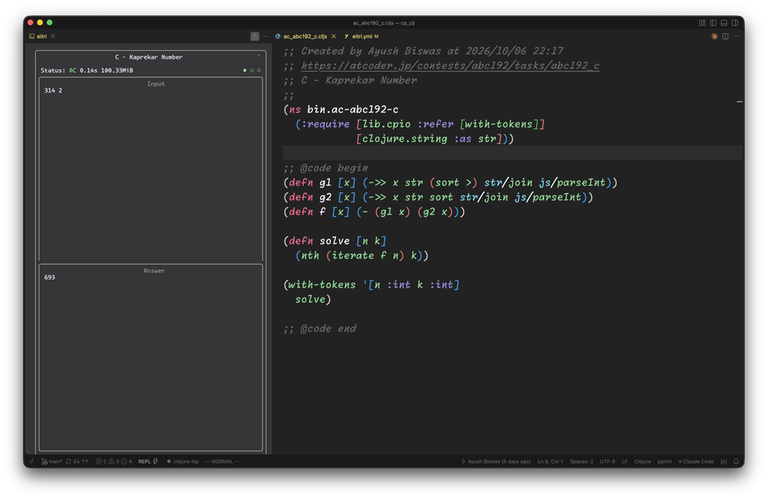
The diagram below summarizes the flow:
[Browser] --(Competitive Companion)--> [Eitri HTTP server]
     ↓
[Eitri creates/updates source file]
     ↓
[Edit in your editor] <--save--> [Eitri watches file changes]
     ↓
[On save: compile & run tests → TUI shows results]
     ↓
[Press 'c' → Eitri generates standalone source → clipboard]
     ↓
[Paste into judge or use cp‑submit]
This workflow keeps problem intake, testing, and submission within the same tool, reducing context switching and manual effort.
The smallest useful quick start
Before you configure a personal library, you can get Eitri running with just the basics: problem intake, file creation, editing, and testing. The following steps use Rust as the primary example, but the same principles apply to other languages.
Prerequisites
- Go 1.22 or newer (to install Eitri via
go install). - A Rust toolchain (
rustcandcargoorrustup). - An editor that can be launched from the command line (e.g., VS Code, Zed, Neovim).
- The Competitive Companion browser extension (for Firefox or Chrome‑based browsers).
Installation
Install Eitri directly from its Go module:
go install github.com/veryshyjelly/eitri@latest
Ensure the Go bin directory ($HOME/go/bin by default) is on your PATH.
First configuration
Run eitri in an empty directory (or your existing CP workspace). Since no eitri.yml exists, it will prompt you to pick a language. Choose Rust. Eitri writes a starter configuration to eitri.yml. Open that file and adjust the following fields to match your setup:
author: "Your Name"
editor: "code {{ .Filename }}"   # VS Code; change to your editor command
Leave the rest as‑is for now. The generated eitri.yml already contains:
- Filename rules for Codeforces, AtCoder, CSES, Aizu, and Kattis.
- A simple source template that adds a header comment and places the problem code (
{{ .Code }}). - An empty code post‑processing modifier (just
{{ .Code }}). - No library configuration (we’ll add that later).
- A Rust compiler setup (
rustc --edition=2024 -O main.rs→./main). create_file: trueandrun_on_save: true.
Trying it out
- Start Eitri:
eitri(oreitri -c eitri.ymlif you used a different name). - Open a problem in your browser (e.g., a Codeforces problem) and click the Competitive Companion button.
- Eitri logs the incoming request, creates a file like
src/bin/1234-a.rs, and opens it in your editor. - Write a minimal solution (e.g., read two integers and print their sum). Save the file.
- Because
run_on_saveis true, Eitri compiles the code, runs it with the provided samples, and displays the results in its TUI. You should see the sample tests pass or fail accordingly. - Press
cto copy the standalone source to your clipboard. Paste it into a file and verify it compiles and runs the same way.
At this point you have experienced Eitri’s core workflow without configuring any personal library.
Understanding the configuration
Eitri’s configuration (eitri.yml) is divided into distinct sections, each responsible for a specific part of the workflow. Thinking in terms of responsibilities makes it easier to customize.
1. Filename rules
filename:
  rules:
    - site: codeforces.com
      regex: "(?:problemset/problem|contest|gym)/(\\d+)(?:/problem)?/([A-Za-z0-9]+)"
      template: "./src/bin/{{ index .Captures 1 }}-{{ index .Captures 2 }}-{{ .Title | stripPrefix \".\" | toKebabCase }}.rs"
- Site – A label used for logging and debugging.
- Regex – A Go regular expression that must contain at least one capturing group. The extension sends the full problem URL; Eitri tries each rule in order until the regex matches.
- Template – A Go template that uses the captured values (
.Captures) and other metadata (.Title,.Author,.Time,.Url) to generate the destination filename. The example above producessrc/bin/1234-a.rsfor a Codeforces problem numbered 1234 with label A.
You can add more rules for other judges by copying this pattern.
2. Source template
template:
  source: ./src/main.rs
  modifier: |
    // Created by {{ .Author }} at {{ .Time }}
    // {{ .Url }}
    // {{ .Title }}
    {{ .Code }}
- Source – Path to a base file that Eitri copies when creating a new solution. It can be empty or contain boilerplate (e.g., a
mainfunction skeleton). - Modifier – A Go template applied to the source file. The template has access to:
.Author,.Time,.Url,.Title(from the problem data).Code– the exact problem statement text sent by Competitive Companion (often unused but available)- The result of the modifier becomes the initial content of the generated solution file.
In the Rust example, the modifier adds a header comment and leaves the rest of the source file (which may contain a fn main() skeleton) unchanged.
3. Editor integration
editor: "zed {{ .Filename }}"
The value is a Go template where {{ .Filename }} is replaced with the absolute path to the generated solution file. Use whatever command opens your editor (e.g., code {{ .Filename }} for VS Code, nvim {{ .Filename }} for Neovim).
4. Compiler and runner
compiler:
  name: Rust
  source: main.rs          # name of the file inside the compilation sandbox
  compile: rustc           # command to run; empty for interpreted languages
  args:
    - --edition=2024
    - -O
    - main.rs
  run: ./main              # command to execute the compiled binary
- Name – Informational only (shown in logs).
- Source – The filename that Eitri expects to find in the temporary sandbox directory (relative to the sandbox root). It must match what the
compilestep produces as input. - Compile – The command to invoke (e.g.,
rustc,g++,javac). Leave empty for languages that need no explicit compilation step (Python, JavaScript, etc.). - Args – Arguments passed to the compile command. The example uses Rust 2024 edition with optimizations.
- Run – The command to run the compiled binary inside the sandbox (e.g.,
./main,java Main,python3 main.py). Eitri prefixes this with the sandbox path.
5. Run on save
run_on_save: true
When true, Eitri watches the generated solution file (via fsnotify) and, on each save, compiles and runs it against the sample tests received from Competitive Companion. The TUI shows input, expected output, actual output, and stderr side by side. The file watcher debounces rapid saves to avoid excessive recompilation.
6. Library configuration (optional)
lib:
  regex: "use\\\\s*(super::)?{{.Name}}(::|;)"
  include:
    _: "./src/lib/"
- Regex – A Go template that, for each library name, produces a regular expression to detect a dependency. The placeholder
{{.Name}}is replaced with the library key from theincludemap. In the Rust example, the regex looks foruse libname;oruse super::libname;(accounting for possiblesuper::when the solution is insrc/binand the library insrc/lib). - Include – A map from library name to file path (relative to the project root). The special key
_acts as a default: any library name not explicitly listed maps to./src/lib/<name>.rs. You can also list specific mappings, e.g.,io: "./src/lib/cpio.rs".
Eitri uses this configuration to build a dependency graph, topologically sort it, and extract @head and @code blocks (see next section).
The full Rust workflow: modular development, standalone submission
Now we examine how Eitri turns a modular Rust project into a single submission file. We’ll use a realistic example based on the actual cp_rust configuration and typical library layout.
Example project layout
project/
├── eitri.yml
└── src/
    ├── bin/
    │   └── 1234-a.rs          # generated solution file
    ├── lib/
    │   ├── cpio.rs            # fast I/O
    │   ├── math.rs            # modular arithmetic, depends on cpio
    │   └── graph.rs           # graph algorithms, depends on cpio and math
    └── main.rs                # optional base template (often empty)
Library files
src/lib/math.rs
@head begin
use crate::cpio::Cpio;
@head end

@code begin
pub fn mod_add(a: i64, b: i64, m: i64) -> i64 {
    (a % m + b % m) % m
}

pub fn solve_with_cpio<R: std::io::BufRead, W: std::io::Write>(mut cp: Cpio<R, W>) {
    let _ = cp.read::<i64>();
    let a = cp.read::<i64>();
    let b = cp.read::<i64>();
    let m = cp.read::<i64>();
    cp.writeln(mod_add(a, b, m));
    cp.flush();
}
@code end
Solution file (src/bin/1234-a.rs)
use cp_lib::cpio::Cpio;
use cp_lib::math::solve_with_cpio;
use cp_lib::graph::solve_graph;

fn main() {
    let (stdin, stdout) = (io::stdin(), io::stdout());
    let mut cp = Cpio::new(stdin.lock(), stdout);
    solve_with_cpio(cp);
    solve_graph(cp);
}
How Eitri processes this
File generation – When a problem arrives, Eitri creates
src/bin/1234-a.rsfrom the template (which may be empty or contain afn main()skeleton). The solution code above is what you write after that.Dependency discovery – Eitri reads every file listed under
lib.include. For the Rust config, the include map has a default_pointing to./src/lib/, so it scanssrc/lib/cpio.rs,src/lib/math.rs, andsrc/lib/graph.rs. For each file, it applies the regex templateuse\\\\s*(super::)?{{.Name}}(::|;)with each library name (cpio,math,graph) to see where that name appears.
- In
math.rs: the lineuse crate::cpio::Cpio;→ after replacing{{.Name}}withcpio, the regex matchesuse.*cpio→ edgemath → cpio. - In
graph.rs:use crate::cpio::Cpio;anduse crate::math::solve_with_cpio;→ edgesgraph → cpioandgraph → math. - In the solution file (also scanned as a “root”):
use cp_lib::cpio::Cpio;anduse cp_lib::math::solve_with_cpio;anduse cp_lib::graph::solve_graph;→ edgessolution → cpio,solution → math,solution → graph.
Topological sort – Eitri builds a graph from these edges, then performs a DFS starting from nodes that are referenced by the solution file (the “roots”). The order ensures dependencies come before dependents. One valid order is:
cpio,math,graph,solution.Header and code extraction – For each library file in order, Eitri extracts:
- Header block: lines between
@head beginand@head end. - Code block: lines between
@code beginand@code end.
It concatenates all header blocks, deduplicates identical lines, and does the same for code blocks (though deduplication of code is less common). The solution file’s own header and code blocks are extracted similarly.
- Code‑generation modifier – Finally, Eitri applies the
code.modifiertemplate (fromeitri.yml) with the following data:
.Author,.Url,.Time(from problem data).Header– the deduplicated header lines.Code– the solution’s code block (after stripping@codemarkers).LibFiles– a slice of library structs, each with.Nameand.Content(the library’s code block)
The Rust code.modifier is:
   code:
     modifier: |
       {{ .Code }}

       {{ range .LibFiles }}

       mod {{ .Name }} {
         {{ .Content }}
       }

       {{end}}
Applying this to our example yields:
Note that the header (use std::io::{self, BufRead, Write};) appears once at the top, deduplicated from the three library files (each had the same use line). Each library is wrapped in a mod block, preserving the original namespace paths (cpio, math, graph) relative to the solution file. The solution can still refer to them via cp_lib::cpio::Cpio if you kept the use statements, but because the code is now self‑contained, you would need to adjust those use paths or rely on the mod blocks. In practice, the author’s workflow keeps the use statements pointing to the library crate (cp_lib) during development, and the generated submission replaces them with inline modules. This works because the library files themselves do not contain external dependencies beyond the standard library.
Key takeaways from the linker
@headand@codemarkers are not required; if absent, the entire file is treated as code (no header).- Header deduplication prevents duplicate
usestatements or macros. - The linker does not parse Rust’s
usedeclarations to build the dependency graph—it relies on the configured regex. This means it will miss dependencies expressed viaextern crateor complex macro‑generated code, but it works well for the common pattern ofuse crate::lib::Item;. - Cyclic dependencies are detected and cause Eitri to exit with an error message.
- Only files listed under
lib.includeare considered for linking; you can point_to a directory or map specific names to specific files.
Testing and submission
- Competitive Companion sends a problem → Eitri creates/updates the solution file.
- You edit the file in your preferred editor.
- On save (if
run_on_saveis true), Eitri:
 - Creates a temporary sandbox directory.
 - Copies the solution file and all library files (preserving the relative layout) into the sandbox.
 - Runs the compile command (e.g., `rustc --edition=2024 -O main.rs`).
 - Executes the run command (e.g., `./main`) with each sample test’s input, capturing stdout and stderr.
 - Compares stdout to the expected output (allowing trailing newline differences).
 - Displays each test’s result in the TUI: input, expected output, actual output, and stderr.
- You iterate until all samples pass.
- When ready, press
cin the TUI. Eitri:
 - Reads the current solution file.
 - Re‑runs the linking process (dependency extraction, topological sort, header/code extraction).
 - Applies the `code.modifier` template to produce the final standalone source.
 - Copies that string to the system clipboard (via the `github.com/atto/clipboard` package).
 - Does **not** write the generated source to disk; it remains in memory until copied.
 - Does **not** recompile as part of the `c` action; the clipboard contains the exact text that was last tested (assuming you saved after the last successful test). **The author confirms that the `c` action always uses the latest saved file.**
- You then paste the clipboard contents into the judge’s editor or use the optional
cp‑submitextension for one‑click submission.
If you need to adjust the solution, simply edit the file, save, and the test loop runs again. The c shortcut always reflects the current state.
Submission
Eitri itself does not submit code to judges. You have two options:
- Manual paste – After pressing
c, go to the judge’s problem page, open the editor, and paste the clipboard contents. - cp‑submit extension – An optional browser extension that watches for the clipboard containing a Eitri‑generated submission and automatically fills the judge’s editor. It works with Codeforces, AtCoder, and similar sites. Install it from its repository and enable it in your browser.
Because the test loop and the c shortcut use the same code‑generation pipeline, you are testing exactly what you will submit (modulo any differences in the compilation sandbox vs. the judge’s environment, which are outside Eitri’s control).
How Eitri works under the hood
Understanding the internal flow helps you customize and debug the tool.
Problem-to-test workflow
[Competitive Companion POST] → [server.HandleData] → [tui.NewModel update] →
[watcher.FileLoop detects file change] → [tui.Model.runTests] →
[core.App.compileAndRun] → [os/exec] → [TUI displays results]
- The HTTP server runs on
127.0.0.1:6174and forwards problem data to the TUI model. - The model stores the problem’s sample tests.
- The file watcher (
fsnotify) triggers on writes to the generated solution file. - On each save, Eitri compiles the solution (using the sandbox) and runs it against the stored samples.
Library-linking workflow
[Solution file + lib.include files] → [regex matching per lib name] → [directed dependency graph] →
[topological sort (DFS)] → [extract @head/@code blocks] → [dedupe headers] →
[apply code.modifier template] → [final source string]
- Dependency discovery is regex‑based, not a full language parser. It works for patterns like
use lib;orimport libbut may miss more complex cases. - The topological sort includes only nodes reachable from the solution file (the roots). Libraries that are not transitively depended on are omitted from the output.
- Header deduplication is literal string comparison; whitespace differences prevent deduplication.
- The
code.modifiertemplate receives.LibFilesas a slice of structs with.Nameand.Content, allowing iteration and per‑library wrapping.
Troubleshooting
Here are common issues and how to address them.
| Symptom | Likely cause | Diagnosis | Fix |
|---|---|---|---|
| No file created after clicking Competitive Companion | Eitri not running or not reachable | Check eitri.log in your OS temp dir (e.g., /tmp/eitri.log on Linux/macOS). Look for Starting HTTP server and Received data. | Start Eitri (eitri). Ensure no firewall blocks port 6174. Verify the extension is pointing to http://127.0.0.1:6174/. |
| File created but with wrong name/path | Filename rule mismatch or incorrect template | Check logs for Filename rule matched output. Test the regex against the URL using a tool like https://regexr.com/. | Adjust the regex or template in eitri.yml. Use capturing groups correctly; remember .Captures is zero‑based. |
| Editor does not open | Invalid editor command | Run the command manually in a terminal with a test path. | Fix the editor string (e.g., missing quotes, wrong executable). Use {{ .Filename }} placeholder. |
| Compilation fails on save | Misconfigured compiler/source/run | Check eitri.log for the exact compile/run command and its output. | Verify compiler.source matches the file you expect in the sandbox. Ensure the compile command exists on PATH. Adjust args and run. |
| Tests run but show stale output | run_on_save true but file not saved | Confirm you actually saved the file (most editors require explicit save). | Save the file. Alternatively, disable run_on_save and trigger tests manually with r in the TUI. |
| Library not detected in generated code | Regex mismatch or missing file | Look for Found dependency logs. If absent, the regex didn’t match. Check that the file exists at the path given in lib.include. | Test the regex with a sample line from your library. Ensure {{.Name}} resolves correctly. Adjust the regex to match your import/use style. |
| Cyclic dependency error | Actual cycle in dependencies | Log shows Cyclic library dependency detected with the involved file. | Break the cycle by moving shared code to a third file or removing unnecessary imports. |
| Generated submission fails to compile | Missing header or incorrect ordering | Inspect the clipboard contents (paste into a file). Verify headers are present and in the right order. | Check that @head/@code markers are present and not malformed. Ensure the code.modifier template is correct for your language. |
Log location: <OS_TEMP_DIR>/eitri.log (e.g., /tmp/eitri.log on Linux/macOS, %TEMP%\eitri.log on Windows). Enable debug logging with eitri -d for more detail.
Advanced customization and next steps
Once the basic workflow is comfortable, you can explore:
- Additional filename rules – Add more sites by copying existing rules and adjusting regex/template for their URL patterns.
- Language‑specific templates – Create a new
.ymlfile intemplates/(e.g.,go.yml) and select it when prompted, or write your own from scratch. - Custom compiler profiles – Define multiple
compilerentries and switch via environment or per‑problem (future work; currently one profile per config). - Library linking tweaks – Adjust the regex to match your language’s import syntax (e.g.,
import {{.Name}}for Python,require "{{.Name}}"for JavaScript). Use the_default or explicit mappings. - Alternative code modifiers – Wrap library code in namespaces, traits, or functors as needed. Prepend/snippet global constants or macros.
- The cp‑submit extension – Install from https://github.com/veryshyjelly/cp-submit for one‑click submission.
If you encounter missing features (e.g., better diagnostics for regex mismatches, pruning of unused libraries, or per‑test time/memory display), consider opening an issue or contributing—Eitri’s source is straightforward and welcoming.
Tool Preview (link)
Final thoughts
Eitri’s strength lies in its integration: it takes the fragmented tasks of competitive programming—problem intake, file management, editing, testing, and submission—and binds them into a coherent, repeatable loop. By understanding how each piece works (filename rules, templating, dependency linking, test execution) you can tailor the tool to your language, library habits, and editor without losing the guarantees that make it reliable during a contest.
Start small: get Eitri running with a basic config, feel the automatic test‑on‑save loop, then gradually add your personal library. The mental model you build will serve you well whether you’re solving Codeforces div2 problems or preparing for an ICPC regional.
Happy coding, and may your submissions always pass the sample tests.


 Comments (0)


