Everyone who prepares problems on this site knows Polygon, a problem-preparation tool maintained by MikeMirzayanov. It's powerful — automatic invocation, validation, checking, stress testing, packages.
However, the web experience is not really convenient. I have to click through the tabs to copy the generator, checker, validator from my computer whenever I change the files.
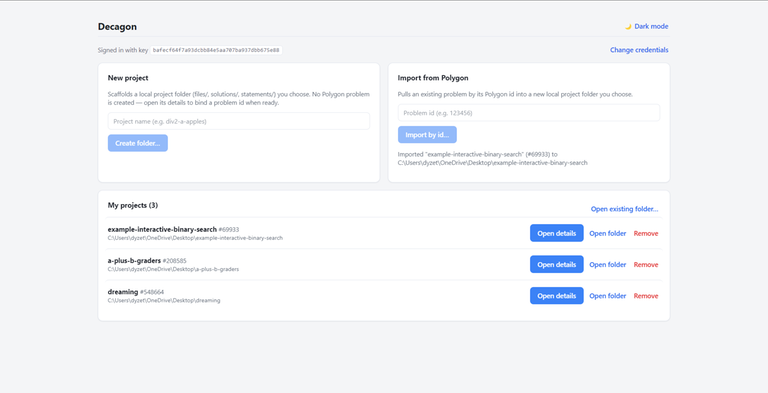
I wanted my problem to live in a local folder I control, and edit it like I edit code. So I built a small desktop app for it: Decagon. It talks to Polygon through the official Polygon API.
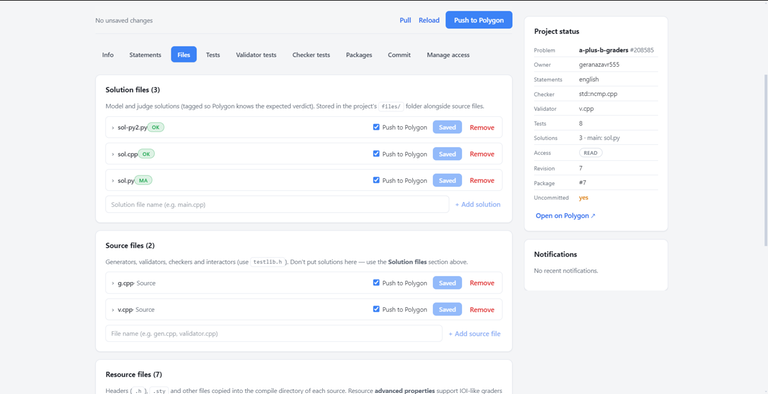
Each problem is one local folder bound to one Polygon problem. Inside the app you get a tabbed editor:
- Info — time/memory limits, input/output files, interactive flag, checker / validator / interactor, points mode.
- Statements — edit every field (legend, input, output, scoring, notes) per language, plus shared resources (images, .sty).
- Files — every file in one place: solutions (each tagged main / correct / wrong-answer / TLE / …), generators / validator / checkers, resource headers, and attachments.
- Tests — manual and script-generated tests per testset, the generation script, scoring groups (points & feedback policy, dependencies), and per-test points. You can bulk-edit groups/points across many tests at once.
- Validator tests & Checker tests — assert a validator accepts/rejects an input, or that a checker gives the expected verdict.
- Packages — build a full / verify package and download the ZIP.
- Commit — save a revision of your working copy.
So no more synchronizing solutions and generators by hand — Pull, edit locally with whatever editor you like, Push. The folder is plain files, so it's git-friendly too.
It's open-source (MIT) and on Github with install instructions. It supports Windows, macOS and Linux. However, I have not tested it on Linux yet so there may be some bugs.
Known limitations (Polygon's API doesn't expose everything)
- Testsets can't be created from the app (no API for it) — create them on the Polygon site, then Pull.
- Stress testing and access/collaborator management have no API, so they're read-only / not implemented here.
- Manage-access only shows your access level.
- Deletion: only tests have a delete API. Removing files / solutions / statements / resources locally does not delete them on Polygon — do that on the website.
- Binary files (e.g. statement images) are pulled but not pushed back.
- Pushing the final package into a round still happens on the Codeforces website — that has no API.
It's still early and probably has bugs. Feature requests, bug reports and PRs are very welcome — open an issue on GitHub. And a big thanks to MikeMirzayanov for Polygon and Codeforces.
Some screenshots: