


UPD (Nov 2026): this post was about v1.3.1, Sameko is at v1.4.0 now. Thanks for all the feedback in the comments, a lot of it made it in:
- Vim mode
- Format on save (13 AStyle styles)
cerrgoes to its own Stderr card, so debug prints stay out of your output and AC/WA- The terminal no longer has to pop up on every run (Settings > Execution > Show Terminal on Run)
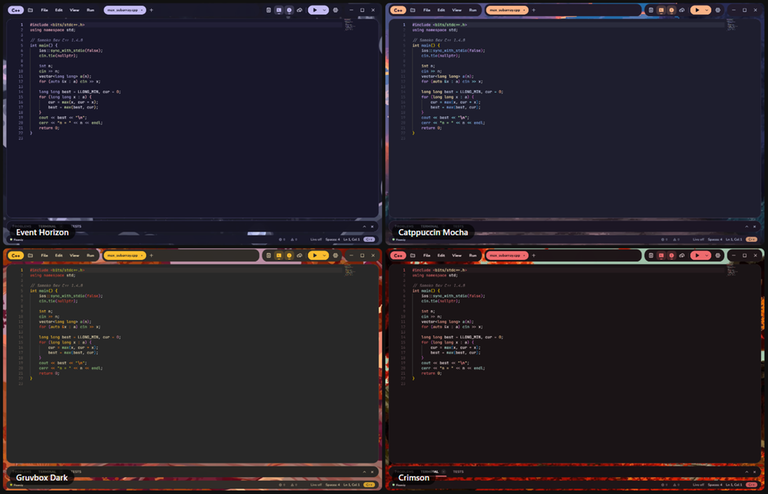
- New themes: Catppuccin Mocha, Gruvbox Dark, Crimson, Event Horizon and new Kawaii ones
- Fixed:
1e5highlighting, and New File in the explorer now uses your template - Faster startup, and a lot of fixes: long correct outputs aren't judged WA anymore, Build & Run always runs what it just built, and a crash can't leave half-written files
- Also: the UI comes in Vietnamese and Chinese, plus Markdown preview and renaming tabs
Thanks ZainUlHaq, balloon, Devana123than, Abdulla_Bin_AH, uday47maurya, DuyMinh3005 and kiiiq_ for the suggestions and bug reports! No macOS build yet (no Mac to test on, sorry!), but submitting from the IDE is coming next update :D
Also, here is the VirusTotal scan for the v1.4.0 installer: 0/56


Hi Codeforces,
When I started learning C++ as a first-year student, I bounced between two options. VS Code looked great, but I spent more time installing MinGW and fixing configs than writing code, just to get <bits/stdc++.h> to work. Every time I switched machines, like the PCs in the lab or at a contest, I had to do it all over again. And it wasn't just me: a lot of my classmates got stuck at the same step before writing a single line of code. Dev-C++ just worked, but it felt stuck in the past, and there was nothing I could change about it.
I'm also the kind of person who likes making my coding space feel like mine. So at some point I thought: why not build the IDE I actually want to use, one that my classmates could just install and start coding with?
That became Sameko Dev C++. It's free and open source, and the goal is simple: as easy as Dev-C++, but modern and yours. 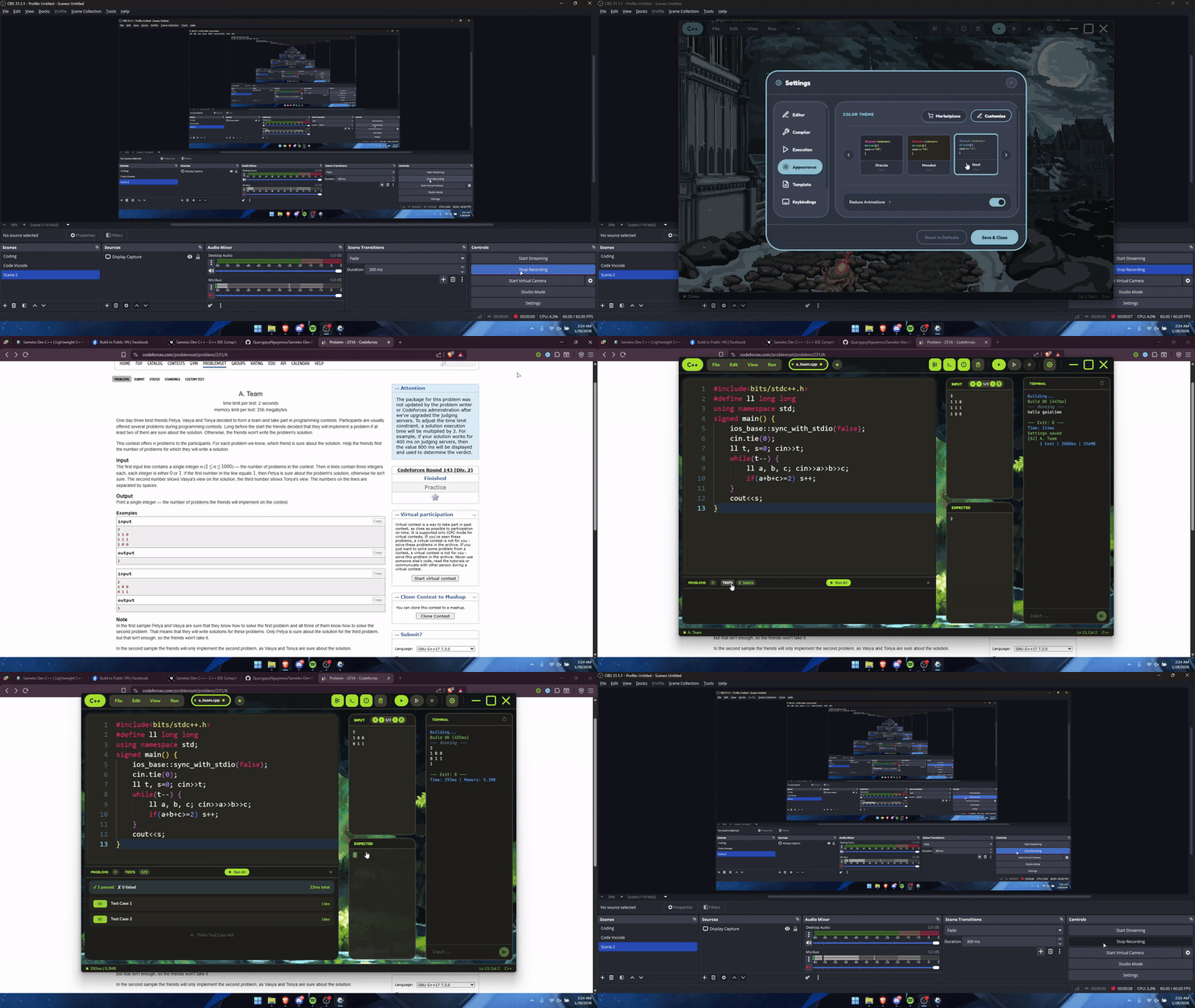
- GCC 16 comes bundled on Windows, so there's no MinGW to set up: install it and start coding.
<bits/stdc++.h>is precompiled, so a typical solution builds in about 0.5–0.7 s on my laptop. - Input / Output / Expected panels that show AC / WA right away, and Competitive Companion support to grab tests from Codeforces and AtCoder.
- A GDB debugger that shows vector, map, set, etc. in a readable way, plus "Auto dry run", which steps through your code by itself while you watch the variables change.
- You can restyle almost everything: colors, themes, even a background image or video.
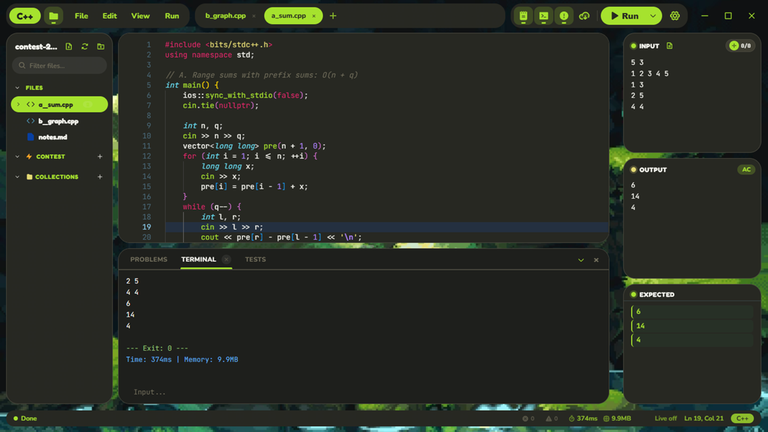
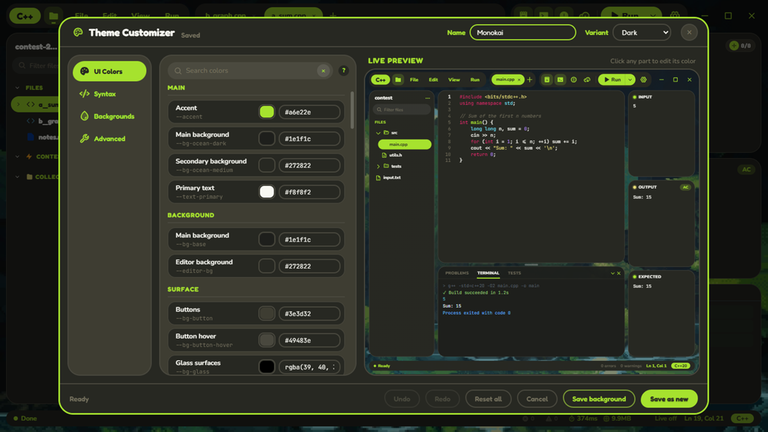
It's my first big project, so there are surely rough edges.
Download: sameko.dev
Source: GitHub
⚠️ The Windows build isn't code-signed yet, so SmartScreen may warn you. VirusTotal: https://www.virustotal.com/gui/file/9a75adbaa997597b277ef9257b2112f583da062d5d30769bb6b0ab034cc5ee53 (0/49)
btw, the name is inspired by the VTuber Sameko Saba. This is an unofficial fan project, not affiliated with or endorsed by her.
Feedback and bug reports are very welcome. Thanks!


The best IDE i've used for C++, its very useful for competitive programming, its also very performative when i used it outside
best of the best
ayy thanks man, glad it's holding up :D
This is so kawaii
thanks ;3333
I love it
cảm ơn bác nhiều nha :D
việt nam cũng có nhiều vtuber mà sao k làm (ví dụ như mình hihi)
nhma bạn là ai cơ
Man stuwupidwjbu what an incredible piece of work, and giving this for free seems illegal, its too good , thanks for it !! also , a small suggestion, can you add the error.txt, or ignore stderr when compiling and define ONLINE_JUDGE too, other than those, its pretty dope, amazing work
thank you so much, this made my day <33 for ONLINE_JUDGE you can already add
-DONLINE_JUDGEin Settings > Compiler > Additional Compile Flags, and the test runner only compares stdout, so cerr debug output won't give you a WA. if you mean writing stderr to an error.txt file, that's a nice idea, I'll look into ityea man, thanks for letting me know about it, and yeah it would be a nice addition, for many of us sublime users, if done, I will use urs, as the primary ide
in the output, a similar next file to be opened, similar to sublime where u see stderr in error.txt it will just make it even more perfect for cp,
orz !
ohh got it, i'll keep it in mind for the next updates. thanks man :D
I really like the code editor it seems perfect for me. I just request one tiny thing that can you please add vim keybinding if they're already there im sorry for being dumb
there's no vim mode yet, but it's a good idea and the editor supports it, so I'll put it on the list
does it work on a mac?
not yet sadly :( I'd really love to, but no one around me uses a mac, so I'd have no way to test it. if I can find a way though, I'll definitely add mac support
trust me you built an excellent thing , i tested in friends laptop,please make mac version,i wanna use it
You can set up a Windows virtual machine with VMware Fusion, and then use this IDE through the virtual machine.
overkill
I think Wine works and is pretty simple + many other uses, I mean it worked my mac and made the original devcpp run but I haven't tried this app though.
just tested it, one of the best projects i've so far in CF. (can you just help me figure it out why my template doesn't show up when i create a new file?)
thanks for trying it out!! you're right, that's a bug on my side. new files created from the explorer don't use your template yet (only Ctrl+N does). already fixed, it'll be in the next update
this is the weirdest inspiration for a name i have ever seen
can't argue with that lol
I love the design of the background.Maybe it's another good choice for learning C++ :D
thank you!! glad you like it, hope it helps with your C++ journey :33
Great for competitive programming, much faster than VS Code. Just need Vim keybinds and the option to format on save along with some packaged formatting styles.
thanks a lot! vim is already on my list since a few people asked. and good call on format on save, the formatter actually supports a bunch of styles already (google, allman, k&r, linux...), i just never exposed them in settings. adding both soon :D
Also, the option to submit solution from within the IDE (like the CPH extension in VS Code) would be very useful, especially during contests.
Please Add more Themes, or tell me if there is a way to add more prebuild ones. I just love these <333
glad you like them <3 you can already make your own in the Theme Customizer, or import themes from a file / github gist in the theme marketplace. more builtin ones are coming too!
The number 5 in 1e5 is not in its correct color, can you fix is please? tysm
sure
I just started CF, so I was really thinking about giving it a try, but it doesn’t have a Mac version :)
ahh sorry about that, i'd really love to make a mac version, but no one around me has a mac so i can't test it yet. if i find a way, i'll definitely make one! good luck on your CF journey :D
Can i use snippets here as like VS Code?
Yes! Go to Settings > Snippets > Add New Snippet, set a trigger word and paste your code. Type the trigger in the editor and it shows up in suggestions. Tab stops like $$$1, $$${1:n}, $0 work the same as in VS Code.
Okay I went to your site and wth!! it's so cute! did you build it all by yourself? amazing work! How did you build it? and any tips for a budding cpp developer? (i just built a unix shell and im looking for more challenges and ways to grow)
Thank you so much! Honestly I'm not really a C++ dev, I'm more into general software development and far from a professional, but a few tips that helped me are reading open source repos to see how others structure their code, and building apps that solve your own pain points since you'll stay motivated when you actually use what you make. anw thanks a lot, comments like yours really keep me going :3
It's really good and useful for beginners without a C++ setup. I would have shifted to this but vs code cp companion extension gives me a submit button and I am lazy to find and select the file to submit the solutions. Also in a live contest the submit button provides me the speed, you can try implementing that in this and then it will be a massive banger.
Thanks for the feedback! I've actually been thinking about adding a submit feature to the IDE for a while, but I'm still working out the best way to do it. I'll try to get it in as soon as I can :3!
The terminal opens automatically every time I run the code, even though I don't want it to. Can this be turned off?
The original idea was to have the terminal open automatically so beginners wouldn't have to look for it. But i get your point, I'll add an option in Settings so you can turn this behavior off if you prefer.
w creativity
thank u so much :D
You won't have all these C++ build problems if you just use Linux
but Linux doesn't support Vanguard, so i can't play LOL or Valorant T_T
waiting for macos release..
no one around me uses a mac, so I'd have no way to test it. if I can find a way though, I'll definitely add mac support :(
Auto comment: topic has been updated by stuwupidwjbu (previous revision, new revision, compare).