


Hey Codeforces,
Like many of you, I wanted an automated, hands-off way to back up all my Accepted solutions to GitHub so I could review my progress over time.
However, after trying existing extensions out there, I kept running into recurring issues: * Requiring an active Codeforces tab session: Many tools rely on content scripts scraping the DOM. If you practice using CLion/VS Code, close your tabs, or submit through tools like Competitive Companion, sync fails. * Hidden tabs popping up: Some tools spawn pinned/hidden tabs (chrome.tabs.create), which break with ACCESS_DENIED_ERROR on contest submissions. * Overwriting solutions: Most tools key by Problem ID (e.g. 1872A.cpp). If you solve a problem with brute force and later rewrite an optimized $$$O(N \log N)$$$ version or port it to Rust, your earlier Accepted attempt gets overwritten. * Plagiarism risk: Pushing solutions immediately to a public repository during live rated contests creates a real risk of plagiarism checks flagging your code.
To fix these issues, I built CommitForce from scratch. It is open-source (MIT licensed) and now officially available on both Microsoft Edge Add-ons and Mozilla Firefox AMO.
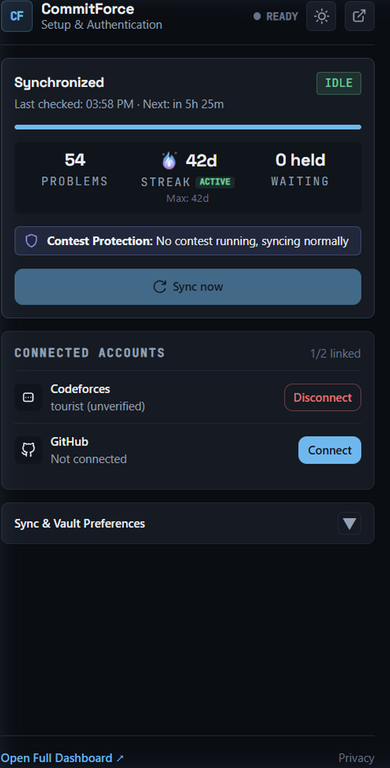

How it works under the hood
1. Zero Open Tabs Required (Cryptographic API Signing)
CommitForce does not touch the DOM or scrape HTML pages. Instead, it runs as a headless background service worker that queries the official Codeforces REST API (user.status with includeSources=true) using request signing:
apiSig = RAND + sha512Hex("RAND/user.status?PARAMS#SECRET")
RAND is 6 random hexadecimal characters. PARAMS is the query string with parameters sorted alphabetically by name (including apiKey and time). SECRET is your Codeforces API secret.
Because requests are cryptographically authenticated with your CF API credentials, Codeforces directly returns the full solution source code in the API payload. You can submit from any editor or IDE, close your browser, and synchronization occurs reliably in the background.
2. Contest-Safe Upload Protection
To stop the extension from publishing during a live contest: * CommitForce automatically checks whether a submission was made during an active contest. * If a contest is in progress, the solution is staged locally in an encrypted queue. * The solution is only synchronized to GitHub once the contest round has officially ended.
3. Preserves Every Accepted Solution (Deduplicated by Submission ID)
CommitForce organizes your repository by difficulty rating and problem folder, indexing files by Codeforces Submission ID:
Codeforces/
├── 800/
│   ├── 1872A_Two_Vessels/
│   │   ├── 222111000.cpp   # First AC (C++ brute force)
│   │   └── 222111555.py    # Second AC (Python rewrite)
│   └── 1915C_Can_I_Square/
│       └── 239840112.rs    # Accepted solution (Rust)
└── 1200/
    └── 1985E_Secret_Box/
        └── 265001122.cpp
Git blob SHAs are computed locally before pushing to prevent duplicate commits or clobbering existing custom files.
4. Dynamic Streak Fire Engine & Dashboard
- Tracks your Current Streak, All-time Record, and rolling 365/30-day records computed from your full activity history.
- Features 6 reactive flame tiers (Cold Start → Kindling Ember → Steady Flame → Blazing Torch → Roaring Inferno → Legendary Plasma) directly in the extension popup and dashboard.
- Historical import lets you filter by problem rating, tags, or programming language.
5. Privacy
Your Codeforces API secret and GitHub tokens are encrypted on your device (PBKDF2-SHA256, 600,000 iterations, AES-GCM-256). The extension only asks for access to codeforces.com and api.github.com. The one server I run is a small Cloudflare Worker that handles the GitHub App sign-in token exchange. It never sees your Codeforces credentials or your code. No analytics. The source is MIT licensed, so you can audit it.
Limitations
- Chrome Web Store listing is still pending, so Chrome and Brave users need to manually load the release ZIP via
chrome://extensions. - You need to create a Codeforces API key and secret (Settings → API).
- Requests are limited to 1 per 2.1 seconds, so the first import of a large history takes a while.
- Automatic sync runs every 6 hours by default (configurable down to 1 hour). Use Sync now for an immediate run.
Links & Installation
- Microsoft Edge Add-ons (Approved & Live): Install on Edge (listed as "Codeforces → GitHub Sync" on Edge)
- Firefox Add-ons (Approved & Live): Install on Firefox AMO
- Chrome / Brave: Load unpacked release from GitHub Releases
- Source Code: GitHub: F0RREALTHO/codeforces-github-sync
If you find this useful or want to support future development, a ⭐ on GitHub would mean a lot!
Feel free to leave your thoughts, bug reports, or feature suggestions below. Happy coding!


