


Edit: Now it's available on Firefox!
Hello everyone, I recently created a Chrome extension for CSES called CSES EXTENSION.
Main Features
- Statistics:: Total number of problems you've solved overall and per category.
- Notes: Add personal notes to each problem to track hints, mistakes, or ideas.
- Sorting Tools: Sort problems by the number of solvers or acceptance rate.
- Copy Buttons: Added wherever you might need quick copying.
- Submit by Text: Submit your code directly without uploading files.
- Auto Login & Theme: Automatically log in and switch between dark/light themes. (Since CSES logs you out every other day)

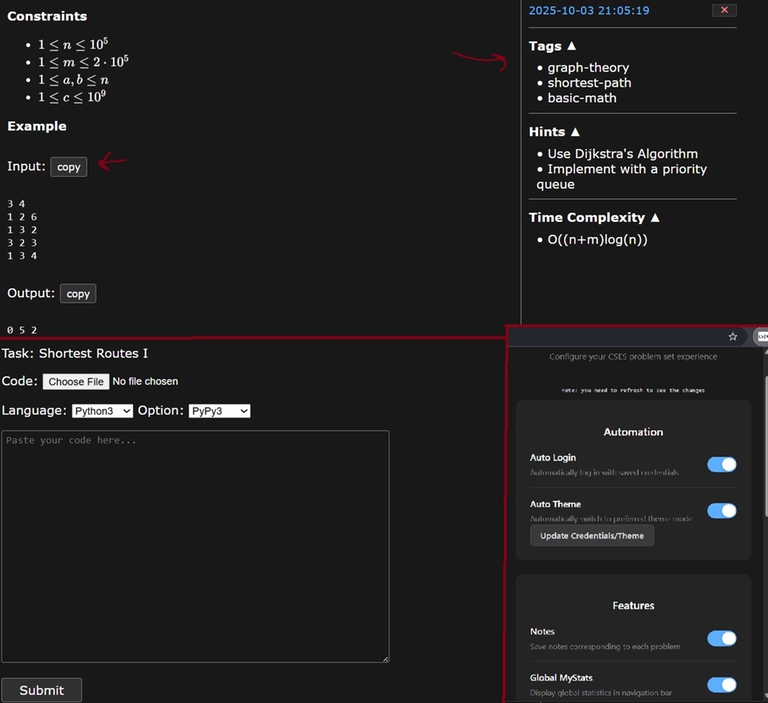
Try it out on the Chrome Web Store or Firefox , and let me know your thoughts or suggestions!


Great! Excited for a firefox launch too!
Now it's available on Firefox as well! link
Awesome bro thanks a lot again!
Can it be made available in firefox too?
Yes, it's currently under review. I'll update the blog, once it's published.
Now it's available on Firefox as well! link
This is veryy veryyyy incredible, thank you so much for this!!! orz
on installing, browser asking for: "This extension is not trusted by enhanced safe browsing. Proceed with caution". Please do something.
This warning appears because the extension is very new. It should go away within a few days. You can safely proceed with the installation.
Is there any extension for "submit by text" on codeforces?
You can use cf-fast-submit script with Tampermonkey for example. It displays the submit page directly in the problem page. There was another script that allow submitting code directly in the select file area, can't seem to find it tho.
Also, it's not that hard now to vibecode a script that does what you need and use it with Tampermonkey. It won't affect the cloudflare in any way, so you still have to wait to pass humanity test.
Do you have it on github?
Github repo for older MVP version.
Github repo for the version uploaded on chrome webstore.
It's built in React, so most of the actual logic resides in this directory path: /vite-project/src
I would like to remind people who wants to install to check for malwares before installing.
True, but just to reassure you.
It's just a bunch of DOM manipulation purely restricted on cses.fi.
If you feel sketchy about storing your cses pwd on your OWN browser's local storage then that's fine, Auto login was something I built for myself and is purely optional :)
You can review the code here it's public. The only permission my extension has is storing sutff locally and doing DOM manipulations on cses.
Lastly all extensions on chrome under go some automated malware tests.
Auto comment: topic has been updated by krish_joshi (previous revision, new revision, compare).
wish i had this when i spammed the CSES problems for icpc lol great work man