


ai generated markdown:
Here are the steps to speed up C++ compilation time by precompiling the "bits/stdc++.h" header on a Windows machine and modifying CodeBlocks' settings to use them:
Delete the Mingw compiler from CodeBlocks and remove Mingw from PATH if it is present.
Download the latest version of msys2.
Open the MSYS2 shell from the start menu and execute the following commands:
- Update the package database by running
pacman -Sy pacman. - Update the package database and core system packages with
pacman -Syu. - Update the remaining packages with
pacman -Su. - For a 32-bit system, install the 32-bit toolchain by running
pacman -S mingw-w64-i686-toolchain. For a 64-bit system, install the 64-bit toolchain withpacman -S mingw-w64-x86_64-toolchain.
Open the Command Prompt as an administrator, navigate to the C: drive, and execute
mklink /D MingGW C:\msys64\mingw64.Edit the system environment variables by going to "Environment Variables," double-clicking on PATH, and adding
C:\MinGW\binas a new entry.Open the Command Prompt and navigate to the path
C:\MinGW\include\c++\13.2.0\x86_64-w64-mingw32\bits.Execute the following 8 commands in the Command Prompt:
g++ -fexceptions -g -std=c++17 stdc++.h -O0 -o stdc++_17_O0.gchg++ -fexceptions -g -std=c++17 stdc++.h -O1 -o stdc++_17_O1.gchg++ -fexceptions -g -std=c++17 stdc++.h -O2 -o stdc++_17_O2.gchg++ -fexceptions -g -std=c++17 stdc++.h -O3 -o stdc++_17_O3.gchg++ -fexceptions -g -std=c++20 stdc++.h -O0 -o stdc++_20_O0.gchg++ -fexceptions -g -std=c++20 stdc++.h -O1 -o stdc++_20_O1.gchg++ -fexceptions -g -std=c++20 stdc++.h -O2 -o stdc++_20_O2.gchg++ -fexceptions -g -std=c++20 stdc++.h -O3 -o stdc++_20_O3.gch
Create a new folder named
stdc++.h.gchinC:\MinGW\include\c++\13.2.0\x86_64-w64-mingw32\bits, and move all the previously generated files into it.Open CodeBlocks and navigate to "Compiler Settings," "Global Compiler Settings," "ToolChain Executables." Set the compiler's installation directory to
C:\msys64\mingw64.In CodeBlocks, go to "Compiler Settings," "Global Compiler Settings," "Compiler Flags," and check the box for
[-O2]under "Optimization."In CodeBlocks, go to "Compiler Settings," "Global Compiler Settings," "Other compiler options," and add
-std=c++17or-std=c++20( important ).In CodeBlocks, go to "Debugger Settings Default," "Executable path," and paste
C:\msys64\mingw64\bingdb.exe.
you should have something like this: 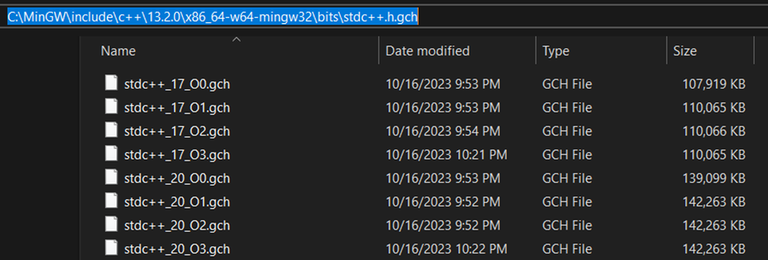


okay. I don't use codeblocks. Will it work for Vscode users too?
yes, make sure to use the msys2 g++ compiler and the -std=c++17 flag.
Maybe it's easier to use the Windows Subsystem for Linux.