Hello everyone!
I built CF UpsolveX, an automated upsolving companion for Codeforces.
It consists of a full-stack web application along with a Chrome extension that helps you track, prioritize, and consistently upsolve the problems you missed in contests.
Problem:
While participating in Codeforces contests, I often found myself saying:
"I'll upsolve the remaining problems tomorrow."
But after a few contests, dozens of unsolved problems start piling up and it becomes difficult to decide:
- Which problems should be upsolved first?
- Which contests still have pending problems?
- How much progress has been made overall?
- Whether I am actually being consistent with upsolving?
Since upsolving is one of the most important aspects of improvement in competitive programming, I felt there should be a better system for tracking and prioritizing missed problems.
Solution:
So I built CF UpsolveX.
It automatically tracks your missed problems across Codeforces contests, prioritizes them intelligently, and helps you stay consistent with upsolving.
The project consists of:
- A full-stack web application.
- A Chrome extension integrated directly into Codeforces.
Both work individually and remain perfectly synchronized.
Core Feature — Smart Priority Queue:
Instead of showing hundreds of unsolved problems in a flat list, CF UpsolveX ranks every problem using a custom priority algorithm:
Priority = w₁ × Recency + w₂ × Difficulty + w₃ × Attempts
The algorithm considers:
- Recency — Recent contest problems rank higher (exponential decay).
- Difficulty — Gaussian bell curve around YOUR rating.
- Attempts — More failed attempts during the contest = higher priority.
Features:
Web Application:
Analytics Dashboard: Upsolve Velocity, Completion Rate, Current Streak & Rating Progression charts.
Contest History: Solved vs Upsolved vs Unsolved statistics & Progress tracking for every contest.
Prioritized Upsolve Queue across all contests.
User customization options: Maximum problem index filtering, Virtual contest toggle & Personalized preferences.
Automated Email reminders after each contests.
Chrome Extension:
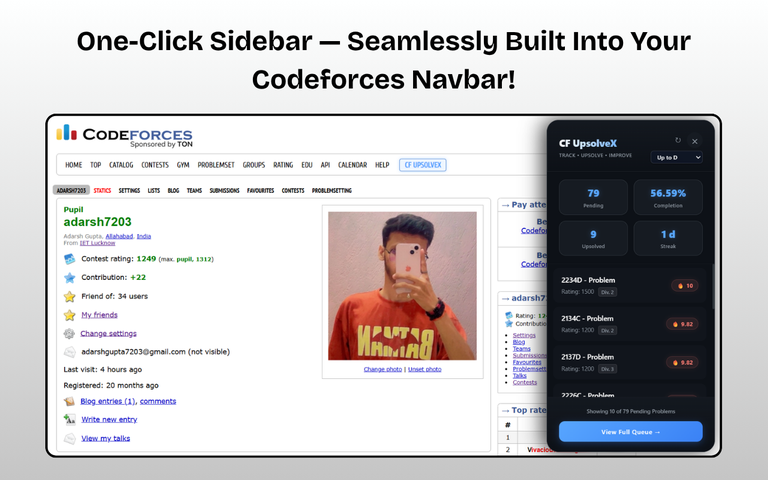
Adds a CF UpsolveX button directly to the Codeforces navbar.
Sleek sidebar integrated into Codeforces.
Displays: Pending problems, Completion percentage & Current streak.
Shows top-priority problems with ratings and division badges.
One-click synchronization.
Problem index filtering without leaving Codeforces.
Works seamlessly alongside the web application.
Web App Screenshots:


Chrome Extension Screenshots:

Download:
Website:
https://cfupsolvex.netlify.app/
Chrome Extension:
https://chromewebstore.google.com/detail/cf-upsolvex-companion/aeflackekjfejbcgaednpccgadpponaa
Use Cases:
- Track missed problems across contests.
- Prioritize what to upsolve next.
- Maintain consistency in upsolving.
- Analyze upsolving progress.
- Improve competitive programming performance.
Tech Stack:
- Frontend: React + Vite, Recharts
- Backend: FastAPI, APScheduler, Jinja2
- Database: Supabase (PostgreSQL)
- Extension: Chrome Manifest V3
- APIs: Official Codeforces API
- Deployment: Netlify + Render
Links:
Codeforces Profile:
https://codeforces.me/profile/adarsh7203
LinkedIn Post:
Feedback:
I would really appreciate your feedback and suggestions!
If you find this useful, please consider upvoting.
Thank you and Happy Upsolving!