-739397's blog

By -739397, history, 6 months ago, In English

In the last contest, my solution for Problem C got TLE with map, but after switching to gp_hash_table + custom hash, the same logic passed in ~375ms.

map takes O(log n) time for each operation, while gp_hash_table is usually much faster with average O(1) complexity. But default hashing can sometimes be exploited with specially crafted test cases, making it as slow as O(n). Using a custom hash helps avoid those collisions and keeps the performance fast in practice. For more details you may consider this blog.

TLE submission: 375591424

AC submission: 375591617

How to use it ??

Templete:

#include <ext/pb_ds/assoc_container.hpp>
using namespace __gnu_pbds;
struct chash {
	const uint64_t C = 4e18*acos(0)+71;
	const int R = chrono::steady_clock::now().time_since_epoch().count();
	size_t operator()(uint64_t x) const {
		return __builtin_bswap64((x^R)*C);
	}
};
template <class K, class V> using HT = gp_hash_table<K, V, chash>;
template <class K, class V> V get(HT<K, V> &u, K x) {
	auto it = u.find(x); return it == u.end() ? 0 : it->second;
}

Usage:

Like map,

  • HT<int, int> cnt;
  • HT<int, pair<int, int>> mp;

So, I think it’s high time to add this optimization trick to your CP journey.

Thanks for reading <3:

Full text and comments »

  • Vote: I like it
  • +7
  • Vote: I do not like it

By -739397, history, 6 months ago, In English

Hello Codeforces!

I would like to introduce a command-line tool I've been working on to make competitive programming more streamlined and efficient: Competitive-Programming-Assistant (CPA). Natively can install in linux and macOS and can install in windows by WSL.

Installation

Prerequisites

Before installing, make sure you have the following installed on your system:

  • g++ and gcc
  • git and curl
  • jq (Command-line JSON processor)
  • nc (netcat, used to listen to Competitive Companion)
  • Competitive Companion Extension installed in your browser.

Command

bash -c "$(curl -fsSL https://raw.githubusercontent.com/sourav739397/Competitive-Programming-Assistant/main/install.sh)"

Key Features

  • Automated Parsing (via Competitive Companion): With a single click in your browser, CPA parses the problem name, time limit, memory limit, and sample tests. It automatically creates the source file and opens it in your editor (default is VS Code).
  • Effortless Testing & Compilation: Run CPA --test sol.cpp to compile and run your solution against all sample tests. It enforces the problem's time limit and provides a beautiful, colorful summary of which tests passed or failed, including execution times. It also supports a dedicated Debug mode (-d) with sanitizers enabled to catch bounds errors and memory leaks and also a debugger.
  • Advanced Output Comparison (testlib.h Support): By default, it compares outputs by ignoring trailing spaces. However, you can seamlessly use testlib.h checkers! For example, run CPA --test -fcmp.cpp sol.cpp to use a strict checker, or use custom ones for real number comparisons (-rcmp6.cpp) or case-insensitive YES/NO (-nyesno.cpp) also can rewrite your own checkers.
  • Built-in Stress Testing: Getting a WA on test 2 and can't figure out why? Write a brute-force solution (slow.cpp) and a test generator (gen.cpp). Then run: CPA --stress sol.cpp slow.cpp gen.cpp 1000
  • Easy Custom Test Cases: Use CPA --add sol.cpp to interactively paste custom inputs and expected outputs without having to manually create .in and .out files.
  • Beautiful CLI & VS Code Integration: The tool features a gorgeous command-line interface with icons and colors. During installation, it even offers to set up VS Code keybindings for you automatically!

GitHub Repository: Competitive-Programming-Assistant

Thanks for reading <3:

Full text and comments »

  • Vote: I like it
  • -7
  • Vote: I do not like it

By -739397, history, 10 months ago, In English

My max rating is 1506, but I can’t move forward and fall back. What should i do now ?

Full text and comments »

  • Vote: I like it
  • +5
  • Vote: I do not like it

By -739397, history, 12 months ago, In English

I need berifly explain of (k — 1) / (y — 1) this formula ? what is the use case of this ?

Full text and comments »

  • Vote: I like it
  • +4
  • Vote: I do not like it

By -739397, 18 months ago, In English

10x Your CP Workflow: A Smooth Bash Script to Automate Parsing, Testing, Stressing and many more

Hello Codeforces fam,

Over the past few months, I've been building and using a personal tool that completely automates my competitive programming workflow. From parsing problems to checking solutions, stress testing, debugging, and even validating edge cases — this tool has made my life 10x easier and smoother. And now, I’m excited to share it with you so that you can boost your productivity!

What is this tool?

It’s a template-driven Bash script designed to integrate with Competitive Companion and streamline everything — whether you're solving problems on Codeforces, AtCoder, LeetCode, CodeChef, or anywhere else.

With just one command, you can:

  • Parse problems
  • Compile and run code
  • Switch between fast and debug modes
  • Stress test using a brute-force checker
  • Validate solutions with custom validators

Features Breakdown

1. Fetching: Grab input & output samples from any major coding platform.

2. Running: Instantly checks your solution against sample test cases and clean test feedback in your terminal.

3. Debug Mode:

  • Easily toggle between fast and debug compile flags
  • Debug flags include:
    • Overflow detection
    • Address sanitization
    • Shows Warnings/errors
  • No need to comment out debug prints before submission

4. Stress Testing: It helps you quickly find the test case where your code gives the wrong answer by comparing it with a brute-force solution — great for fixing Wrong answer on test 2 problems.

5. Validator Support:

  • Perfect for constructive problems where multiple correct outputs are possible. Suppose the problem says:

    You are given a number n. Print any two integers whose sum is n. Both 2 3 and 4 1 are valid outputs for n = 5. A validator script can check if the outputted numbers sum to n, rather than requiring a specific answer.

  • Script checks whether output is valid, not just identical

6. Manual Tests: Add custom test cases manually & run them automatically along with other test cases.

Why Use This?

If you're tired of repetitive setup, manual copying of test cases, comment out dbg(...), or losing time doing stress testing manually, and validate your solution (for constructive) in paper — this script is built for you.

It’s all about automating the boring parts, so you can focus on the problem-solving that actually matters.

How to Get It?

1. Preparing Your System (Linux/Mac/Windows)

By default, Linux and macOS support Bash scripts natively. But Out of the box, Windows does not support it. To run Bash scripts on Windows, we need to enable WSL (Windows Subsystem for Linux), which allows you to run a full Linux environment directly on Windows.

Install WSL (Only for windows users)

2. Prerequisites Install

Before you start, make sure you have the following tools installed on your system: g++, gdb, jq (JSON processor),curl (command-line downloader), git

Install on Linux / Windows(WSL)
Install on MacOS

3. Install the Script

Just copy and paste this command into your terminal:

one line copy paste install

You can find the full source code, documentation, and updates on the project's GitHub page: Competitive-Programming-Automation

Optional: Install Nerd Font for Cool Icons

For an enhanced terminal experience with beautiful icons, you can install a Nerd Font. Just download your favorite font from their website and set it as your terminal font. This will make script outputs and prompts look even cooler!

How to Use the Script ?

After installing the script, here’s a comprehensive walkthrough to get you started:

1. Run the Script

  • Navigate to Your Workspace:
    Open a terminal and cd into your coding folder (e.g., cd ~/codeforces).
  • Start the Script: cprun --help Running cprun --help displays a detailed help menu. This menu lists all available commands, flags, and usage examples for the script.

2. Parse a Problem

To parse input test cases using the Competitive Companion extension, use the --parse option:

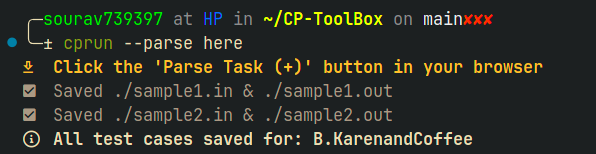
  1. Open your terminal and run: cprun --parse [here/group]

    • No argument (default):
      Saves samples in a folder named after the problem.
    • here:
      Saves samples in the current directory.
    • group:
      Saves samples into contest/problem folders.

    This lets you organize your test cases exactly how you prefer (exactly where you write solution).

  2. Then, in your browser, go to the problem page and click the Competitive Companion extension icon. The script will automatically fetch and save the test cases.

Sample Output

3. Compile and Test

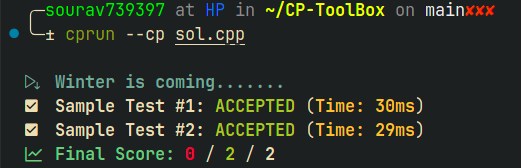
To quickly check your solution against the sample test cases, use the --cp flag:

Formet : cprun --cp your_solution.cpp

  • Replace your_solution.cpp with the filename of your code.
  • Write your solution file in the same folder where you fetched the problem samples.

    This command will automatically compile your code, run it against all sample inputs, and display a summary of passed/failed cases in your terminal.

Sample Output

4. Toggle Debug/Fast Mode

To switch between Debug and Fast modes, use the -d flag when running the script:

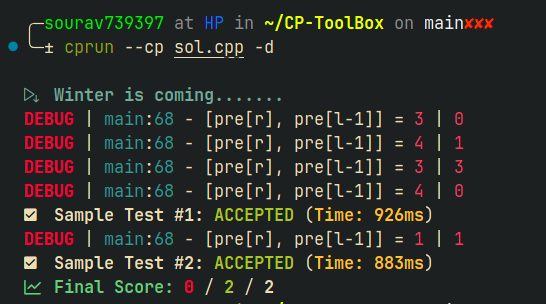
Formet : cprun --cp -d your_solution.cpp

  • Debug Mode (-d):
    Compiles your code with debug flags (e.g., -DLOCAL -fsanitize=address -fsanitize=undefined -fsanitize=signed-integer-overflow -D_GLIBCXX_DEBUG).
    This helps catch bugs, undefined behavior, and makes debugging easier.

  • Fast Mode (default):
    Compiles with optimization flags (e.g., -O2) for speed, suitable for final testing and submission.

#ifdef LOCAL
#include "debug.h"
#else
#define dbg(...)
#endif

When running in Debug Mode, LOCAL is defined, so dbg(...) works as expected. In Fast Mode (for submission), dbg(...) expands to nothing, so your debug prints are ignored—no need to edit your code!

Sample Output

5. Stress Testing

Stress testing helps you catch tricky bugs by comparing your solution against a brute-force or validator approach (to stress test constructive problem) on many generated test cases.

Usage
  • <your_solution.cpp>: Your main solution.
  • <brute_force.cpp>: A slow but correct solution for unique-answer problems.
  • <validator.cpp> -m: A custom validator for problems with multiple valid outputs.
  • <generator.cpp>: Script to generate random test cases.
  • <number_of_tests>: Number of tests to run (default: 100).

Note:
If your solution fails against the brute-force solution during stress testing, the script will prompt you with:

Do you want to add this test case? (Y/N):

By choosing Y, you can save this failing test case for future checks and debugging. This helps you build a collection of tricky cases to strengthen your solution.

Examples:

  • For unique solutions (using brute force): cprun --stress mysol.cpp brute.cpp gen.cpp 100

  • For multiple valid outputs (using validator): cprun --stress mysol.cpp validator.cpp -m gen.cpp 100

  • -m used for multiple solution


6. Add Custom Tests

To manually add your own custom test cases, use the -a flag:

Usage :cprun -a

This command will prompt you to enter the input and the expected output for a new test case. The script will save your custom test alongside the parsed samples, and include it automatically in future test runs.


7. Validate Solutions with a Custom Checker

For problems where multiple valid outputs are possible (like constructive problems), you need a checker to verify correctness instead of simply comparing outputs.

How it works:

  • Write a checker.cpp that reads:

    1. Your solution's output
    2. The expected (reference) output
  • The checker determines if your output is valid (not necessarily identical to the reference), according to the problem's requirements.

Usage : cprun --cp your_solution.cpp -m

must write checker in checker.cpp and add -m argument.

  • The script will:
    • Run your solution to produce output.
    • Run the checker with your produce output, and the expected output .
    • Report whether your solution passes the checker.

When to use:
Use this for problems where there are many correct answers, and you want to ensure your output meets the problem's criteria (e.g., sum to n, valid permutation, etc.), not just matches a sample output.

Tips for an Even Smoother Workflow

While this script works in any terminal and does not require any specific editor or IDE, using Visual Studio Code (VS Code) is highly recommended for the best experience. VS Code offers:

  • Built-in terminal support: Run all commands directly inside your editor.
  • Custom keyboard shortcuts: Speed up your workflow by mapping frequent actions to keys.

Example VS Code Shortcuts

You can set up these handy shortcuts in VS Code to automate common tasks:

  • Alt + F: Fetch problem samples (parse)
  • Alt + R: Run your solution
  • Alt + D: Run with debug flags (executes under LOCAL)

To add these shortcuts, copy the keybindings.json from the repo and import it into your VS Code settings.

Note:
This script is universal—you can use it in any terminal, with any editor, on any platform. No editor lock-in!

Conclusion

Thanks for reading! I hope you found this post helpful or at least interesting. If you have any suggestions, spot a mistake, or just want to share your thoughts, feel free to leave a comment below — I'd really appreciate the feedback.

Special thanks to SahilH for helping me write this blog.

Full text and comments »

  • Vote: I like it
  • +22
  • Vote: I do not like it

By -739397, 18 months ago, In English

I’m Finally a Specialist

Milestone Screenshot

After participating in Codeforces Round 1024 (Div-2), consistency proved to be key — and after 4 months of solving around 10 problems a day, mostly in the range of [my rating-300] up to my current rating, I’ve reached the Specialist on Codeforces!
In general, I solved about 150 to 200 problems per rating, gradually building my confidence.


About three months ago, I completed a single Bash script that fully automates my competitive programming workflow.
Since then, I’ve been using it daily from parsing problems and checking solutions, to stress testing, debugging, and even validating edge cases.
This tool has seriously made my competitive programming journey 10× easier and I’ll be sharing it soon!

Thanks for reading and stay tuned for what’s next.

Full text and comments »

  • Vote: I like it
  • +34
  • Vote: I do not like it