


Hi everyone,
When practicing on /problemset, difficulty ratings alone do not tell the whole story. A 1600-rated problem today looks very different from a 1600-rated problem from an older round.
With the massive growth in active participation (from a few thousand contest entrants years ago to over 30,000 today) and shifting rating calibrations over the years, the contest meta has changed substantially and for a few other reasons as well (ykyk).
If you want to target realistic contest practice (like grinding current Div. 2 C problems to stop choking mid-contest, or drilling Div. 3 D and E), filtering purely by rating ends up mixing in decade-old rounds with completely different difficulty curves.
This came directly out of my own frustration and personal need while practicing. I wanted a way to focus on contemporary Div. 2 C problems without manually hunting through past contests, so I built a small Chrome extension called CFLevels to solve it.
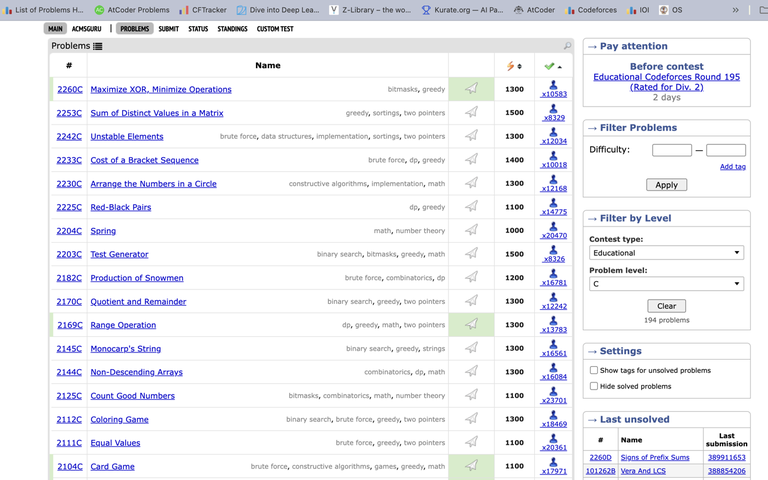
What it does
It adds a → Filter by Level box right below the native Filter Problems box on /problemset:
- Multi-select contest types: Div. 1, Div. 2, Div. 3, Div. 4, Educational, Global, CodeTON, and others.
- Multi-select problem levels: Pick single or multiple letters (for example, practicing both
CandDproblems together). - Works with native filters: Combine it directly with Codeforces tags (
dp,graphs) or difficulty rating ranges (1400-1600). - Smart narrowing: The level list automatically adjusts to show only letters that actually exist for your selected contest types and tags.
- Preserves contest ordering: Keeps problems sorted from newest to oldest by default, while still allowing you to use Codeforces' native reordering (by rating or solved count).
- Native look: Styled to match Codeforces' own roundbox borders and contest-page multi-select dropdowns.
Privacy & Under the hood
- Zero tracking, no external server, no login required.
- Everything runs client-side using public Codeforces API endpoints (
contest.listandproblemset.problems). - Metadata is cached locally in your browser so pages load fast.
Links
- Chrome Web Store: CFLevels on Chrome Web Store
- GitHub Repository: https://github.com/ShubhamPhapale/CFLevels
PS: This is my first Chrome extension. I didn't hesitate for a second paying the $5 Google developer fee, given how much I've received from the CF community over the years, giving something back was an easy call.
Hope this makes targeted practice easier for anyone trying to push past their rating plateau. If you run into any bugs or have ideas to improve it, let me know in the comments!


