


Hey Codeforces!↵
↵
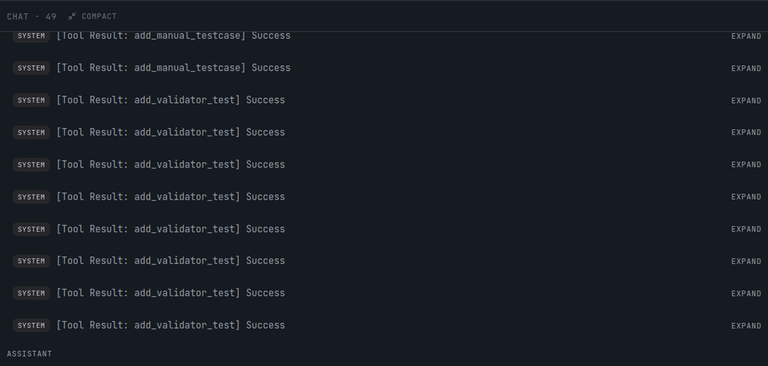
We've been quietly shipping something we're really excited about at **[Repovive](https://repovive.com)**: a full **AI-assisted problem authoring workspace** built for competitive programming setters. No more juggling six text files, a half-broken `gen.cpp`, a checker you wrote at 3 AM, and a `tests/` folder you're afraid to touch.↵
↵
We call it **the Build page**, and there are two flavors live right now: **v1** (the original chat-first design) and **v2** (the new full multi-panel workspace). This post walks through what they are, why we built two, and what each one is good for.↵
↵
> *TL;DR — v2 turns problem authoring into a Cursor-style IDE for problem setters. You chat with **Hannah**, our DeepSeek-powered agent, while she edits your statement, solution, validator, generators, checker, and test cases in real time. Multiple authors, one session, live sync.*↵
↵
---↵
↵
↵
↵
---↵
↵
## Table of Contents↵
1. [What is a "build session"?](#what-is-a-build-session)↵
2. [v1 — The Original Chat-First Build Page](#v1--the-original-chat-first-build-page)↵
3. [v2 — The Workspace](#v2--the-workspace)↵
* [The Three Panes](#the-three-panes)↵
* [Left: The File Rail](#left-the-file-rail)↵
* [Center: The Monaco Editor + Tooling Tabs](#center-the-monaco-editor--tooling-tabs)↵
* [Right: Hannah, the Agent](#right-hannah-the-agent)↵
4. [What Hannah Can Actually Do](#what-hannah-can-actually-do)↵
* [Write tools](#write-tools)↵
* [Read tools (diagnostic)](#read-tools-diagnostic)↵
5. [Headline Features](#headline-features)↵
* [Collaboration](#collaboration)↵
* [Polygon import/export](#polygon-importexport)↵
* [TPS — Parameterized test generation with attribution](#tps--parameterized-test-generation-with-attribution)↵
* [Long-running agent on its own service](#long-running-agent-on-its-own-service)↵
* [Transparent pricing](#transparent-pricing)↵
6. [How to Try It](#how-to-try-it)↵
7. [What's Next](#whats-next)↵
↵
↵
## What is a "build session"?↵
↵
A build session is a single authoring workspace tied to one problem (or one bundle of problems if you split them up). Every artifact your problem needs lives inside it:↵
↵
- **Statement** (description, constraints, input/output format — Markdown + Latex)↵
↵
- **Model solution** (`solution.cpp`)↵
↵
- **Alternative solutions** (your wrong-on-purpose codes, brute forces, slow `O(n^2)` references — track verdicts: AC / WA / TLE / MLE)↵
↵
- **Validator** (`testlib.h`, ensures inputs match the constraints)↵
↵
- **Generators** (`gen_small.cpp`, `gen_random.cpp`, `gen_corner.cpp`, …)↵
↵
- **Gen/data script** (parameterized recipe: `gen_random 1 100 1000`, one per test)↵
↵
- **Checker** (default / `wcmp` / `ncmp` / `fcmp` / `lcmp` / custom `testlib.h`)↵
↵
- **Interactor** (for interactive problems)↵
↵
- **Manual test cases** + sample marking↵
↵
- **Polygon import/export** package↵
↵
- **Learn pages** (tutorial / editorial drafts)↵
↵
- **Collaborators** (other authors on your team)↵
↵
You walk in with an idea. You walk out with a problem that's ready to drop straight into a contest.↵
↵
---↵
↵
## v1 — The Original Chat-First Build Page↵
↵
↵
↵
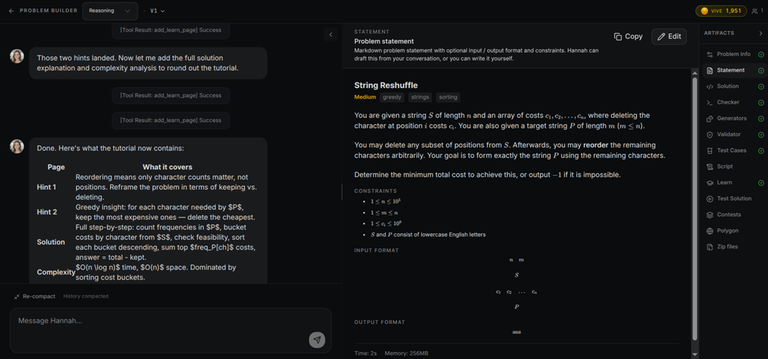
The first version of Build was deliberately minimal: **a chat with Hannah on the left, an artifact rail on the right**. You'd describe the problem, she'd write the solution, the rail would light up as each artifact got created.↵
↵
```↵
┌──────────────────────────────┬────────────────────────┐↵
│ │ Statement ✓ ready │↵
│ Chat with Hannah │ Solution ✓ ready │↵
│ (streamed SSE) │ Validator … │↵
│ │ Generators (2) │↵
│ [ user message ] │ Checker ncmp │↵
│ [ Hannah turn ] │ Problems → │↵
│ │ Polygon ⤓ export │↵
│ [ textarea + Send ] │ │↵
└──────────────────────────────┴────────────────────────┘↵
```↵
↵
v1 nailed the **"talk to the model, watch artifacts appear"** loop. It still works great for quick problems where you just want to dictate the idea and have Hannah scaffold everything.↵
↵
**Status:** v1 is **frozen** — bug-fix only, no new features. It still ships and is still the right tool when:↵
↵
- You're on mobile (landscape) and want a simpler surface.↵
- You're authoring a small, fast problem and don't want the full IDE in your face.↵
- You're showing the workflow to someone new — v1's UX is genuinely easier to teach.↵
↵
You can flip back to v1 from the version switcher in the top-right of any build session.↵
↵
↵
↵
---↵
↵
## v2 — The Workspace↵
↵
v2 is what happens when you stop thinking of "the build page" as a chat and start thinking of it as **an IDE for problem authoring**.↵
↵
↵
↵
### The Three Panes↵
↵
```↵
┌────────────┬───────────────────────────────────┬────────────────┐↵
│ │ │ │↵
│ Files │ Monaco Editor │ Chat with │↵
│ (rail) │ ┌──────────────────────────┐ │ Hannah │↵
│ │ │ solution.cpp │ │ │↵
│ ▸ stmt │ │ #include <bits/stdc++.h> │ │ tier: max ▼ │↵
│ ▸ solu ✓ │ │ using namespace std; │ │ ──────────── │↵
│ ▸ valid ✓ │ │ ... │ │ [messages] │↵
│ ▸ gen_sm │ └──────────────────────────┘ │ │↵
│ ▸ gen_rnd │ ┌──────────────────────────┐ │ [textarea] │↵
│ ▸ checker │ │ output / test cases / │ │ [Send/Stop] │↵
│ ▸ alt_brt │ │ TPS attribution panel │ │ │↵
│ ▸ polygon │ └──────────────────────────┘ │ │↵
│ │ │ │↵
└────────────┴───────────────────────────────────┴────────────────┘↵
20% 60% 20%↵
```↵
↵
Both side panes are **resizable + collapsible** (snap-collapse to a 4% strip), and your layout is persisted per-user.↵
↵
#### Left: The File Rail↵
↵
↵
↵
Every artifact is a row. Drag to reorder generators. Right-click to rename or delete. Status badges tell you what's healthy at a glance:↵
↵
- **statement** with a `ready` checkmark when complete↵
- **solution** with verification status↵
- **validator** with last-run status↵
- **gen_small**, **gen_random**, … each generator is its own row↵
- **checker** with the type label (`wcmp`, `ncmp`, `fcmp`, custom, …)↵
- **alt_brute** / **alt_slow** / … alternative solutions with their verdict pills↵
- Footer rows for **Learn Pages**, **Polygon**, **Problems**, **Generate Tests**, **TPS Overview**↵
↵
#### Center: The Monaco Editor + Tooling Tabs↵
↵
↵
↵
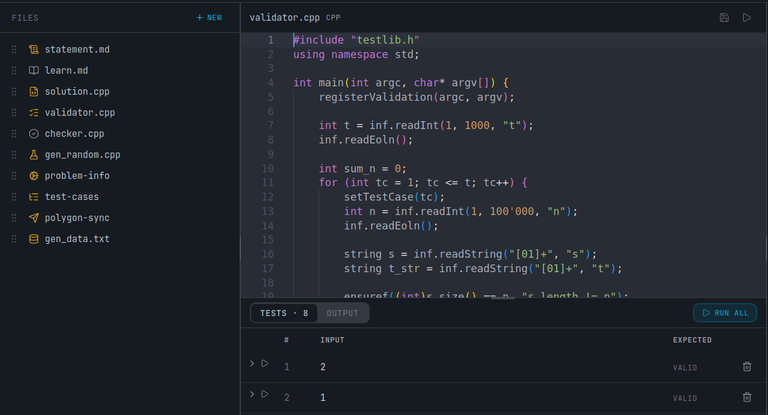
The center pane is just **Monaco** — full C++ / Markdown / plain-text syntax highlighting, the editor you already use. It loads the right tool surface depending on which artifact you opened:↵
↵
↵
| Artifact opened | What you see |↵
| ------------------ | ------------------------------------------------------------------------- |↵
| `solution` | Solution code + tabs for alt solutions with their verdicts |↵
| `validator` | Validator source + inline run output against current test cases |↵
| `checker` | Checker source + checker-specific test cases |↵
| `gen_data` | Gen/data script editor with parse hints |↵
| `statement` | Markdown editor with LaTeX preview |↵
| `testcases` | Manual test-case CRUD + sample marking |↵
| `tps_overview` | Per-line attribution: which gen/data line produced which test, freshness |↵
| `problem_info` | Title, slug, difficulty, tags, time/memory limits, points, `markedReady` |↵
| `learn_pages` | Editorial / tutorial markdown content |↵
↵
↵
↵
#### Right: Hannah, the Agent↵
↵
↵
↵
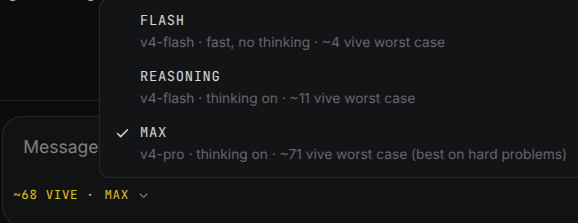
This is where Hannah lives. Three tiers to pick from per message:↵
↵
- **flash** — fast, no thinking, cheapest↵
- **reasoning** — DeepSeek thinking mode on↵
- **max** — DeepSeek-pro + thinking, the heaviest hitter↵
↵
The estimated vive cost is shown before you hit Send. Messages stream in chunks: **`text_chunk`**, **`reasoning_chunk`** (collapsible thinking), **`tool_call`**, **`tool_result`**, **`turn_complete`**, and a terminal `done` / `error` / `timeout` / `cancelled`. The Stop button is wired to the **server-side processing lock** — clicking it actually aborts the in-flight DeepSeek stream within ~1 second.↵
↵
---↵
↵
## What Hannah Can Actually Do↵
↵
Hannah isn't a chatbot that suggests code for you to paste. She has **direct write access to your build session** via 28 tools. Here's the lineup:↵
↵
### Write tools↵
↵
| Tool | Effect |↵
| ----------------------------------- | --------------------------------------------------------------- |↵
| `update_solution` | Replace the model solution (`solution.cpp`) |↵
| `update_generator(name, code)` | Create or update a named generator |↵
| `delete_generator(name)` | Remove a generator and clean dependent gen/data lines |↵
| `update_validator` | Set the input validator (`testlib.h`) |↵
| `update_gen_data` | Set the parameterized generation script (one command per line) |↵
| `update_problem_text` | Write description, constraints, I/O format, interaction format |↵
| `update_problem_settings` | Title, slug, difficulty, tags, limits, points, `markedReady` |↵
| `update_checker` | Set checker type: default / `wcmp` / `ncmp` / `fcmp` / `lcmp` |↵
| `update_custom_checker` | Custom checker source (`testlib.h`) |↵
| `set_interactor` | Mark interactive + write the interactor source |↵
| `add_manual_testcase` | Add a single test case (input + expected output) |↵
| `mark_samples` | Promote test cases to samples |↵
| `add_or_update_alternative_solution`| Add a brute force / slow ref / wrong-on-purpose solution |↵
| `add_or_update_learn_page` | Author tutorial / editorial markdown |↵
| `list_problems` | List `contest_problems` generated from this session |↵
↵
### Read tools (diagnostic)↵
↵
`read_solution`, `read_validator`, `read_generator(s)`, `read_gen_data`, `read_problem_info`, `read_problem_text`, `read_checker`, `read_testcases`, `read_alternative_solutions`, `read_learn_pages`.↵
↵
She gets a **compact manifest** at the start of each turn (heavy bodies collapsed to one-line summaries with line counts), so she only burns tokens on the artifacts she actually needs to touch.↵
↵
↵
↵
---↵
↵
## Headline Features↵
↵
### Collaboration↵
↵
↵
↵
Multiple setters can work in the same build session at the same time. Edits sync via WebSocket connection. Live cursors, live edits, no merge conflicts. Add collaborators by email from the top bar; the owner manages access. (ongoing/ under development)↵
↵
### Polygon import/export↵
↵
↵
↵
If you already have problems on **Polygon**, you can pull them straight in and keep editing in Repovive. Going the other way, every session exports as a Polygon-compatible ZIP (statement + solution + tests + checker), so you're not locked in.↵
↵
### TPS — Parameterized test generation with attribution↵
↵
↵
↵
Instead of writing test files by hand, you write a **gen/data script**:↵
↵
```↵
gen_small 1 10 42↵
gen_small 1 10 1337↵
gen_random 100 1e5 42↵
gen_random 100 1e5 1337↵
gen_corner max_constraints↵
```↵
↵
Each line runs through one of your generators, gets validated by the validator, and is checked against the model solution. Each test case carries **attribution** back to the line that produced it. If you change a generator, all tests that came from it get marked **stale** — one click to regenerate.↵
↵
### Long-running agent on its own service↵
↵
Hannah's turns can take ~10 minutes.↵
↵
The cancellation path is properly atomic: No orphaned turns, no double-charging.↵
↵
### Transparent pricing↵
↵
↵
Vive cost is shown **before** you send. Charging policy is enumerated — every turn ends with a classified result (`done`, `timeout`, `cancelled`, `upstream_5xx`, `upstream_4xx`, `tool_dispatcher_error`, `local_exception`) and the charge for each is fixed in a policy table. No surprise bills.↵
↵
---↵
↵
## How to Try It↵
↵
1. Sign in at [repovive.com](https://repovive.com).↵
1. Go to [repovive.com/dashboard/problems](https://repovive.com/dashboard/problems).↵
2. Hit **Create Problem** on your dashboard. Give it a name. You're in.↵
3. The default route lands you in **v2**. Use the top-right version switcher to flip to v1 if you want to.↵
4. Watch Hannah scaffold the statement, solution, validator, a couple of generators, and a checker — all in one turn.↵
5. Drag a teammate in via **Collaborators**.↵
↵
↵
↵
---↵
↵
## What's Next↵
↵
Things we're actively working on:↵
↵
- **Editor-level Hannah commands** — highlight a few lines in your solution and ask Hannah to refactor them in-place.↵
- **More external imports** — beyond Polygon, we want DOMjudge / Kattis-style packages.↵
- **Richer alt-solution diagnostics** — auto-classify why an alt is WA (which tests, which checker verdict).↵
- **Voice-driven build sessions** (`/build/[id]/live`) — currently paused while we finalize the LiveKit transcript pipeline, but the foundation is there.↵
↵
If you try the Build page and something feels off — or right — please leave a comment. We read all of them, and the v1→v2 evolution was driven almost entirely by what setters told us they wanted.↵
↵
Happy authoring,↵
The Repovive team.↵
↵
↵
↵
We've been quietly shipping something we're really excited about at **[Repovive](https://repovive.com)**: a full **AI-assisted problem authoring workspace** built for competitive programming setters. No more juggling six text files, a half-broken `gen.cpp`, a checker you wrote at 3 AM, and a `tests/` folder you're afraid to touch.↵
↵
We call it **the Build page**, and there are two flavors live right now: **v1** (the original chat-first design) and **v2** (the new full multi-panel workspace). This post walks through what they are, why we built two, and what each one is good for.↵
↵
> *TL;DR — v2 turns problem authoring into a Cursor-style IDE for problem setters. You chat with **Hannah**, our DeepSeek-powered agent, while she edits your statement, solution, validator, generators, checker, and test cases in real time. Multiple authors, one session, live sync.*↵
↵
---↵
↵
↵
↵
---↵
↵
## Table of Contents↵
1. [What is a "build session"?](#what-is-a-build-session)↵
2. [v1 — The Original Chat-First Build Page](#v1--the-original-chat-first-build-page)↵
3. [v2 — The Workspace](#v2--the-workspace)↵
* [The Three Panes](#the-three-panes)↵
* [Left: The File Rail](#left-the-file-rail)↵
* [Center: The Monaco Editor + Tooling Tabs](#center-the-monaco-editor--tooling-tabs)↵
* [Right: Hannah, the Agent](#right-hannah-the-agent)↵
4. [What Hannah Can Actually Do](#what-hannah-can-actually-do)↵
* [Write tools](#write-tools)↵
* [Read tools (diagnostic)](#read-tools-diagnostic)↵
5. [Headline Features](#headline-features)↵
* [Collaboration](#collaboration)↵
* [Polygon import/export](#polygon-importexport)↵
* [TPS — Parameterized test generation with attribution](#tps--parameterized-test-generation-with-attribution)↵
* [Long-running agent on its own service](#long-running-agent-on-its-own-service)↵
* [Transparent pricing](#transparent-pricing)↵
6. [How to Try It](#how-to-try-it)↵
7. [What's Next](#whats-next)↵
↵
↵
## What is a "build session"?↵
↵
A build session is a single authoring workspace tied to one problem (or one bundle of problems if you split them up). Every artifact your problem needs lives inside it:↵
↵
- **Statement** (description, constraints, input/output format — Markdown + Latex)↵
↵
- **Model solution** (`solution.cpp`)↵
↵
- **Alternative solutions** (your wrong-on-purpose codes, brute forces, slow `O(n^2)` references — track verdicts: AC / WA / TLE / MLE)↵
↵
- **Validator** (`testlib.h`, ensures inputs match the constraints)↵
↵
- **Generators** (`gen_small.cpp`, `gen_random.cpp`, `gen_corner.cpp`, …)↵
↵
- **Gen/data script** (parameterized recipe: `gen_random 1 100 1000`, one per test)↵
↵
- **Checker** (default / `wcmp` / `ncmp` / `fcmp` / `lcmp` / custom `testlib.h`)↵
↵
- **Interactor** (for interactive problems)↵
↵
- **Manual test cases** + sample marking↵
↵
- **Polygon import/export** package↵
↵
- **Learn pages** (tutorial / editorial drafts)↵
↵
- **Collaborators** (other authors on your team)↵
↵
You walk in with an idea. You walk out with a problem that's ready to drop straight into a contest.↵
↵
---↵
↵
## v1 — The Original Chat-First Build Page↵
↵
↵
↵
The first version of Build was deliberately minimal: **a chat with Hannah on the left, an artifact rail on the right**. You'd describe the problem, she'd write the solution, the rail would light up as each artifact got created.↵
↵
```↵
┌──────────────────────────────┬────────────────────────┐↵
│ │ Statement ✓ ready │↵
│ Chat with Hannah │ Solution ✓ ready │↵
│ (streamed SSE) │ Validator … │↵
│ │ Generators (2) │↵
│ [ user message ] │ Checker ncmp │↵
│ [ Hannah turn ] │ Problems → │↵
│ │ Polygon ⤓ export │↵
│ [ textarea + Send ] │ │↵
└──────────────────────────────┴────────────────────────┘↵
```↵
↵
v1 nailed the **"talk to the model, watch artifacts appear"** loop. It still works great for quick problems where you just want to dictate the idea and have Hannah scaffold everything.↵
↵
**Status:** v1 is **frozen** — bug-fix only, no new features. It still ships and is still the right tool when:↵
↵
- You're on mobile (landscape) and want a simpler surface.↵
- You're authoring a small, fast problem and don't want the full IDE in your face.↵
- You're showing the workflow to someone new — v1's UX is genuinely easier to teach.↵
↵
You can flip back to v1 from the version switcher in the top-right of any build session.↵
↵
↵
↵
---↵
↵
## v2 — The Workspace↵
↵
v2 is what happens when you stop thinking of "the build page" as a chat and start thinking of it as **an IDE for problem authoring**.↵
↵
↵
↵
### The Three Panes↵
↵
```↵
┌────────────┬───────────────────────────────────┬────────────────┐↵
│ │ │ │↵
│ Files │ Monaco Editor │ Chat with │↵
│ (rail) │ ┌──────────────────────────┐ │ Hannah │↵
│ │ │ solution.cpp │ │ │↵
│ ▸ stmt │ │ #include <bits/stdc++.h> │ │ tier: max ▼ │↵
│ ▸ solu ✓ │ │ using namespace std; │ │ ──────────── │↵
│ ▸ valid ✓ │ │ ... │ │ [messages] │↵
│ ▸ gen_sm │ └──────────────────────────┘ │ │↵
│ ▸ gen_rnd │ ┌──────────────────────────┐ │ [textarea] │↵
│ ▸ checker │ │ output / test cases / │ │ [Send/Stop] │↵
│ ▸ alt_brt │ │ TPS attribution panel │ │ │↵
│ ▸ polygon │ └──────────────────────────┘ │ │↵
│ │ │ │↵
└────────────┴───────────────────────────────────┴────────────────┘↵
20% 60% 20%↵
```↵
↵
Both side panes are **resizable + collapsible** (snap-collapse to a 4% strip), and your layout is persisted per-user.↵
↵
#### Left: The File Rail↵
↵
↵
↵
Every artifact is a row. Drag to reorder generators. Right-click to rename or delete. Status badges tell you what's healthy at a glance:↵
↵
- **statement** with a `ready` checkmark when complete↵
- **solution** with verification status↵
- **validator** with last-run status↵
- **gen_small**, **gen_random**, … each generator is its own row↵
- **checker** with the type label (`wcmp`, `ncmp`, `fcmp`, custom, …)↵
- **alt_brute** / **alt_slow** / … alternative solutions with their verdict pills↵
- Footer rows for **Learn Pages**, **Polygon**, **Problems**, **Generate Tests**, **TPS Overview**↵
↵
#### Center: The Monaco Editor + Tooling Tabs↵
↵
↵
↵
The center pane is just **Monaco** — full C++ / Markdown / plain-text syntax highlighting, the editor you already use. It loads the right tool surface depending on which artifact you opened:↵
↵
↵
| Artifact opened | What you see |↵
| ------------------ | ------------------------------------------------------------------------- |↵
| `solution` | Solution code + tabs for alt solutions with their verdicts |↵
| `validator` | Validator source + inline run output against current test cases |↵
| `checker` | Checker source + checker-specific test cases |↵
| `gen_data` | Gen/data script editor with parse hints |↵
| `statement` | Markdown editor with LaTeX preview |↵
| `testcases` | Manual test-case CRUD + sample marking |↵
| `tps_overview` | Per-line attribution: which gen/data line produced which test, freshness |↵
| `problem_info` | Title, slug, difficulty, tags, time/memory limits, points, `markedReady` |↵
| `learn_pages` | Editorial / tutorial markdown content |↵
↵
↵
↵
#### Right: Hannah, the Agent↵
↵
↵
↵
This is where Hannah lives. Three tiers to pick from per message:↵
↵
- **flash** — fast, no thinking, cheapest↵
- **reasoning** — DeepSeek thinking mode on↵
- **max** — DeepSeek-pro + thinking, the heaviest hitter↵
↵
The estimated vive cost is shown before you hit Send. Messages stream in chunks: **`text_chunk`**, **`reasoning_chunk`** (collapsible thinking), **`tool_call`**, **`tool_result`**, **`turn_complete`**, and a terminal `done` / `error` / `timeout` / `cancelled`. The Stop button is wired to the **server-side processing lock** — clicking it actually aborts the in-flight DeepSeek stream within ~1 second.↵
↵
---↵
↵
## What Hannah Can Actually Do↵
↵
Hannah isn't a chatbot that suggests code for you to paste. She has **direct write access to your build session** via 28 tools. Here's the lineup:↵
↵
### Write tools↵
↵
| Tool | Effect |↵
| ----------------------------------- | --------------------------------------------------------------- |↵
| `update_solution` | Replace the model solution (`solution.cpp`) |↵
| `update_generator(name, code)` | Create or update a named generator |↵
| `delete_generator(name)` | Remove a generator and clean dependent gen/data lines |↵
| `update_validator` | Set the input validator (`testlib.h`) |↵
| `update_gen_data` | Set the parameterized generation script (one command per line) |↵
| `update_problem_text` | Write description, constraints, I/O format, interaction format |↵
| `update_problem_settings` | Title, slug, difficulty, tags, limits, points, `markedReady` |↵
| `update_checker` | Set checker type: default / `wcmp` / `ncmp` / `fcmp` / `lcmp` |↵
| `update_custom_checker` | Custom checker source (`testlib.h`) |↵
| `set_interactor` | Mark interactive + write the interactor source |↵
| `add_manual_testcase` | Add a single test case (input + expected output) |↵
| `mark_samples` | Promote test cases to samples |↵
| `add_or_update_alternative_solution`| Add a brute force / slow ref / wrong-on-purpose solution |↵
| `add_or_update_learn_page` | Author tutorial / editorial markdown |↵
| `list_problems` | List `contest_problems` generated from this session |↵
↵
### Read tools (diagnostic)↵
↵
`read_solution`, `read_validator`, `read_generator(s)`, `read_gen_data`, `read_problem_info`, `read_problem_text`, `read_checker`, `read_testcases`, `read_alternative_solutions`, `read_learn_pages`.↵
↵
She gets a **compact manifest** at the start of each turn (heavy bodies collapsed to one-line summaries with line counts), so she only burns tokens on the artifacts she actually needs to touch.↵
↵
↵
↵
---↵
↵
## Headline Features↵
↵
### Collaboration↵
↵
↵
↵
Multiple setters can work in the same build session at the same time. Edits sync via WebSocket connection. Live cursors, live edits, no merge conflicts. Add collaborators by email from the top bar; the owner manages access. (ongoing/ under development)↵
↵
### Polygon import/export↵
↵
↵
↵
If you already have problems on **Polygon**, you can pull them straight in and keep editing in Repovive. Going the other way, every session exports as a Polygon-compatible ZIP (statement + solution + tests + checker), so you're not locked in.↵
↵
### TPS — Parameterized test generation with attribution↵
↵
↵
↵
Instead of writing test files by hand, you write a **gen/data script**:↵
↵
```↵
gen_small 1 10 42↵
gen_small 1 10 1337↵
gen_random 100 1e5 42↵
gen_random 100 1e5 1337↵
gen_corner max_constraints↵
```↵
↵
Each line runs through one of your generators, gets validated by the validator, and is checked against the model solution. Each test case carries **attribution** back to the line that produced it. If you change a generator, all tests that came from it get marked **stale** — one click to regenerate.↵
↵
### Long-running agent on its own service↵
↵
Hannah's turns can take ~10 minutes.↵
↵
The cancellation path is properly atomic: No orphaned turns, no double-charging.↵
↵
### Transparent pricing↵
↵
↵
Vive cost is shown **before** you send. Charging policy is enumerated — every turn ends with a classified result (`done`, `timeout`, `cancelled`, `upstream_5xx`, `upstream_4xx`, `tool_dispatcher_error`, `local_exception`) and the charge for each is fixed in a policy table. No surprise bills.↵
↵
---↵
↵
## How to Try It↵
↵
1. Sign in at [repovive.com](https://repovive.com).↵
1. Go to [repovive.com/dashboard/problems](https://repovive.com/dashboard/problems).↵
2. Hit **Create Problem** on your dashboard. Give it a name. You're in.↵
3. The default route lands you in **v2**. Use the top-right version switcher to flip to v1 if you want to.↵
4. Watch Hannah scaffold the statement, solution, validator, a couple of generators, and a checker — all in one turn.↵
5. Drag a teammate in via **Collaborators**.↵
↵
↵
↵
---↵
↵
## What's Next↵
↵
Things we're actively working on:↵
↵
- **Editor-level Hannah commands** — highlight a few lines in your solution and ask Hannah to refactor them in-place.↵
- **More external imports** — beyond Polygon, we want DOMjudge / Kattis-style packages.↵
- **Richer alt-solution diagnostics** — auto-classify why an alt is WA (which tests, which checker verdict).↵
- **Voice-driven build sessions** (`/build/[id]/live`) — currently paused while we finalize the LiveKit transcript pipeline, but the foundation is there.↵
↵
If you try the Build page and something feels off — or right — please leave a comment. We read all of them, and the v1→v2 evolution was driven almost entirely by what setters told us they wanted.↵
↵
Happy authoring,↵
The Repovive team.↵
↵
↵


