


Like CHelper for Java, caide automates certain common tasks that you do during programming competitions: parsing, running and debugging problem tests, inlining library code. It currently supports C++ and C# programming languages. The list of supported online judges is here.
Download here. You can also install VS extension directly from Visual Studio.
Documentation:
- command line application (Windows and Linux)
- VS extension
- TC plugin (cross-platform).
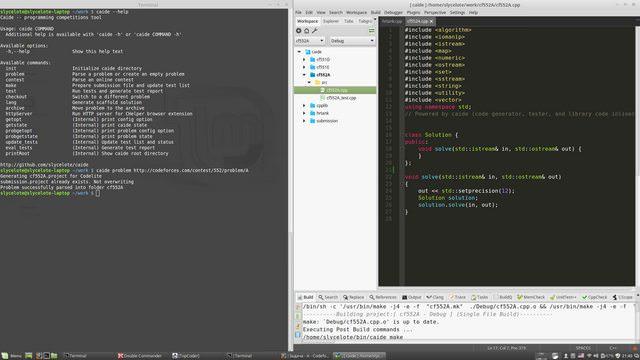
Codelite and command line caide in Linux: (full size)
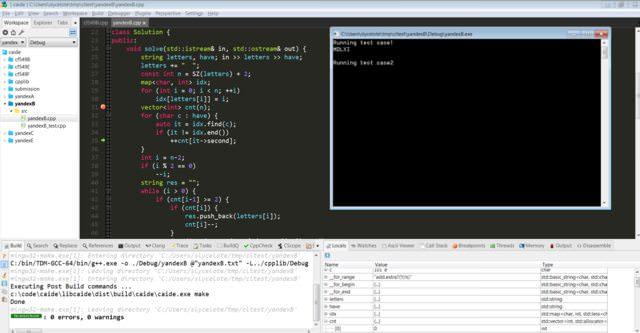
Codelite in Windows: (full size)
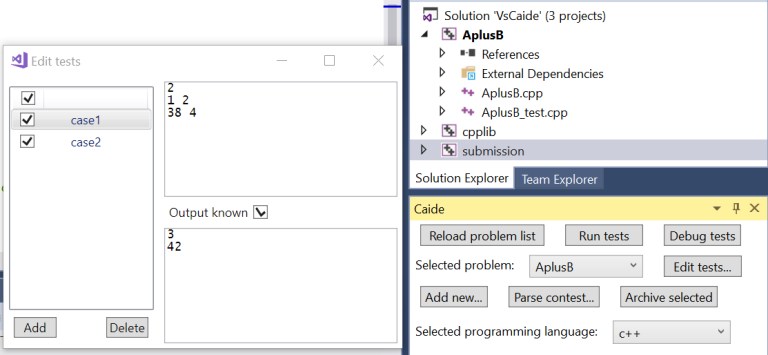
Visual Studio:


How to install it on Linux?
Simply unpack the executable and put it in your PATH.
I've unpacked to many directories from PATH.
After packing I checked using terminal;
When I write
caidein terminal as usual user, it returnsIf I write as root user, it returns
Make sure it's executable (sudo chmod +x /bin/caide)
this can happen when you're trying to run 32-bit application under 64-bit system. Type
ldd caideand install all the missing libraries.will it work in visual studio express 2013 ?
No, you need Community Edition. It's free.
Added a 64-bit Linux build.
It seems that Caide does not work with C++11 feature =delete. Caide removes unused declaration of constructor but remains attributes of this declaration.
For example, in solution file we have
Caide converts it to
submission.cpp:Compiler fails on file
submission.cppwith errorerror C2059: syntax error : '='.Is it possible to fix it?
Another bug is removing method that is called from destructor (in case if destructor is not called explicitly).
Because the code is rather huge, I put it on Pastebin: http://pastebin.com/CRQDgguM. The first two cases are failed, the last one worked fine, but it is not convenient to write in such way during coding.
Thanks, I created issues for both bugs: #1, #2.
By the way, until it's fixed you can use a workaround: mark the method that gets removed with
/// caide keepcomment.To continue reporting streak just want to mention strange thing (not a bug actually).
I bet lots of participants have some defines like
to make their code work under different environment.
Caide inliner module removes this
ifdefand you need to fix yousubmission.cppfile manually. It is not very convenient to repeat this process every time. Is there any opportunity to tell inliner not to remove thisifdef?There is a setting
keep_macrosin caide.ini file which you can use for this.Hmm, it does not seem to work properly.
I have platform-specific
ifdef:In the
submission.cppI get the next:Probably I am mistaken, but for me it seems that Caide removes that part of
ifdefthat should be choosen by compiler on my computer (so I have defined_WIN32and this part is removed). I expected both parts to remain unchanged.Are you sure that the LLD macro is actually used? Unused macro definitions get removed.
Yeah, it is my fault :(
Thanks for help!
can i get (caide) for VS 2015 ??!
It's planned for the nearest future, stay tuned ;)
Caide 2.1 changes:
How to use it for windows ?
If you use Visual Studio, simply install VsCaide extension. If you want to use the command line application, see README
I am using code lite at the moment , how to install for that?
First, make sure you use latest Codelite version. Then see "Codelite" section here. There is no plugin for Codelite, so you'll have to parse problems / switch between them from command line. The rest (compiling, running) can be done inside the IDE. Let me know if you have any questions.
First of all, thank you very much for this awesome tool.
Second, after the most recent update to VS2015 the following needs to be added to
clang_optionsin caide.ini:-D__EDG__,Thanks, I will add it to the default config!
I published 2.2 release. This release contains improvements in C++ inliner. In particular, unused namespaces and comments attached to unused declarations are now removed. Make sure to have
-fparse-all-commentsclang option in yourcaide.inifile.Note: If you use latest release of VS 2015, you need to add the clang option
-D__EDG__in yourcaide.inifile. Thanks to Jacob for catching this.Also, in light of recent cin/scanf fiasco, I'd like to remind that you can configure caide to use printf/scanf, fast I/O or any other kind of I/O. All you have to do is modify the signature of
solvefunction and make corresponding changes in 3 template files:main_template.cpp,solution_template.cppandtest_template.cpp(the last one is quite large but you're interested only inrunTestfunction). A sample implementation for printf/scanf is here: https://github.com/slycelote/caide/tree/release/libcaide/doc/samples/cstyle-ioAnother VS update broke the extension again... A hack to fix this is to add
-D__is_assignable=__is_nothrow_assignabletoclang_optionsconfig entry.caide version 2.3 is out with support for Visual Studio 2017 and fixes in HackerRank and CodeChef parsers.
Hi. I was looking for a C++ code inliner, and found this one. I built it for Mac and looks like it's working, but I have some questions.
First, I parsed some problem and manually entered the correct sample output. But after I compile and run it, it outputs
Why error and Testwasnotrun?
The more general question is how to use it in conjunction with some IDE? It would be convenient to use CMake to create a project with one target for every problem. Is there a way to configure problemID to be just one letter, not including any contest details? And what's the expected workflow for problems that cannot be parsed?
It's surprising that it compiles out of the box, I didn't expect that :) If you could upload the Mac build somewhere, it would help other users.
That's puzzling, especially the lack of spaces. Can you send me a zip archive of your caide directory right after you do that?
Right now there is Codelite support, as described in the README. You still have to use terminal to switch between problems and create new ones, but the rest should be possible to do within Codelite.
Yes, it is in my plans, but no ETA yet. I've added a Github issue for it here
Not at the moment, I've added a Github issue here
You can create a code skeleton for the problem with
caide problem A, and then create in/out files manually. Checkoutcaide problem -h.How can I build it for mac ? is there a readme for the process ?
Generally, you should be able to follow Linux instructions from
libcaide/INSTALL.txtwith some adjustments (e.g. instead of g++ you'd install XCode and use clang I guess?). There's also unofficial docker build that you may be able to use: https://github.com/mfornet/caide-dockerThanks for the amazing tool!
I am not able to parse tasks through CHelper in Chrome. I read many forums but all in vain. It would be great if u could explain how I can do parsing.
Thanks :)
Which page are you parsing? Do you use VsCaide or command line tool? What are the error messages?
I tried parsing Codeforces questions but did not succeed.
I use VsCaide and there are no error messages. It just does not parse task!!
Also, I get the following error when I parse the problem with its URL:
Unable to start program 'C:\Users\Dishant\Desktop\VisualSolution\cf859A\Debug\cf859A.exe'.
I am a beginner and am pretty sure might be missing something silly!! Sorry for the trouble!
Please send screenshots and a zipped copy of your solution's folder in a private message.
In the Visual Studio 2017 Community Edition i have installed VsCaide extension..... But When I build a solution it is showing build errors...... 499 errors its showing...... cmath, cerno etc....... Can you fix it ?
Please make sure you installed Windows Universal CRT SDK via VS 2017 installer. If it still doesn't work, send me a zip archive of the whole directory.
I already have installed Windows 10 SDK (10.0.15063.0) for Desktop C++ x86 and x64
Windows 10 SDK (10.0.15063.0) for UWP: C#, VB, JS
Windows 10 SDK (10.0.15063.0) for UWP: C++
Windows 8.1 SDK
but can't find the Windows Universal CRT SDK that you mentioned above....
It's under Individual Components tab, section "Compilers, build tools and runtimes" in the installer.
how to solve this problem https://imgur.com/a/ur5ej ?
cpplib project is for your library code; create/parse a problem and put your solution there, in
solve()function.how to modify the templates ?
Sorry, didn't see your message :( Just use any text editor to modify files in templates/ directory.
is any one here using this tool with visual studio 2017 and work with it properly, i need his help in guiding me !!
Did you follow these instructions? Where are you stuck?
the instructions are not thorough enough, after create new solution and add task, what configurations should i do because a lot of errors were shown up !!
Please send me screenshots and error messages in PM.
YouTube Tutorial on how to use VsCaide: https://youtu.be/qNKBdqifxpU
Thanks, this is a good tutorial :)
New in version 2.4:
-std=c++14is now default,-std=c++1zis available for C++17 supportDownload from github here. Visual Studio extension will be published to the marketplace soon.
Somehow after the update I am having troubles with creating solution in VsCaide.
The problem I am getting is "caide.exe: g++: readCreateProcessWithExitCode: does not exist (No such file or directory)"
caide initfrom an empty directory?Apparently g++ was in the path before, but then disappeared.
I’ve added it back, and then everything worked again.
I'll publish a fix soon.
Can you port it over to Sublime Text 3 because many competitive programmers use a lightweight ide like sublime text instead of Visual Studio
I created github issues for VSCode and Sublime Text, but I don't plan to work on them (at least until I see enough interest). Please note that most functionality is implemented in a command line executable, which means that:
make test-debug. I also use the following config for vim-fswitch to quickly switch between sample input/output files:Fixed in version 2.4.1:
Awesome job, I wish I had known about this tool earlier.
I've noticed a bug where the inliner removes code which is only used inside static_assert's:
Thanks johannesk. I created a bug here.
Note that there are two ways to work around bugs. You can mark a declaration with
/// caide keepcomment to always keep it, or you can mark a member of a class with/// caide conceptcomment to keep it as long as the class is used. Something like this may be an acceptable workaround:Thanks for the quick reply slycelote. Another inlining bug, this time with friend classes:
(yes, I'm actually writing such code o.O)
The workaround is perfectly fine for the time being, so it's not a big deal.
Both will be fixed in the next version. BTW, keep these bug reports coming even if there's a workaround :)
I am trying to use caide with CHelper browser extension. It seems that for GCJ website this coupling doesn't work. On VS General Output window I can see the following message every attempt to parse a problem:
Yeah, CHelper extension itself doesn't parse the problem, it just passes the contents of the webpage to whatever tool is listening, so parsing has to be implemented by the tool. I recommend using Competitive Companion.
Version 2.5.0 is released on Github. I'll upload VS extension to the marketplace in a few days.
General
C++ inliner:
-std=c++17).Visual Studio extension:
Hi, I am using Competitive Companion in conjunction with Caide (VS extension). Normally this setup works very well, and thanks so much for maintaining the Caide tool.
However, I recently faced an issue when parsing any problem from Facebook Hacker Cup. I am getting the following error on Caide side:
Could not parse input JSON: Error in $: key "result" not foundI am not sure if this is a problem on the Caide side or in the Competitive Companion, so I'll just report it in both threads.
Replying here as well for visibility to slycelote:
Competitive Companion 2.18.0 sets the input type on parsed FHC problems to "regex" and passes along a "pattern". Caide 2.5.0 doesn't support this input type, and although it is a breaking change I am going to let it stay because it improves the quality of the extracted data and because most tools already work with it (all except for Caide it seems).
The regex input type is supposed to read input from the last modified file matching the given pattern. Example implementations can be found for C++ in JHelper here and for Java in CHelper here.
I would contribute this myself if I knew my way around FP languages, but since I don't I hope you (slycelote) could add support for it.
Thanks Jacob for the bug report and Jasperr for detailed explanation. I created a github issue to track this: https://github.com/slycelote/caide/issues/31
Actually, I cannot reproduce the issue. Generated code reads from stdin, but there's no error.
Is there a way to log problem JSON completely?
Competitive Companion logs it to the browser's console if debug mode is enabled in settings.
Jacob, I published a beta build here. It has code template for "regex" file type and also logs JSON in Output window (General tab). Can you try it out (in a new VS solution)?
I will try it out, but not earlier than next week. Thanks.
In the upsolving the issue doesn't reproduce. I'll check today during the actual round using that build with JSON logging.
That build worked like a charm, thanks.
New in version 2.6.0:
VS extension will be published shortly.
New in version 2.7.0:
verbose_test_reportoption to display results of all tests rather than just failed onesVisuaL studio doesn't show running time per test... :)
Try recreating the solution
I did it 2 times, xdd... I use vs 2019, can u upload a youtube video regarding regarding the setup and etc... Sorry for my informalities (for instance using "u"). Cuz, caide was updated and there ain't any updated tutorials...
Are any of your tests failing? By default, only details of failed tests are displayed. You can use
verbose_test_reportoption to display details for all tests. See docs here, that page is always up to date. And the video-tutorial here should still be relevant, there haven't been many changes since then.Does it support Kotlin? İf can you please add it
Kotlin is currently not supported. If you could port solution/test templates in this directory to Kotlin, it could increase the chances of it being included)
New in version 2.8:
Umm, will it be available for VS 2022 preview?
VS 2022 will be supported when it's released.
For VS 2022 preview.
Preview != release
Any idea why: LINK : fatal error LNK1104: cannot open file 'C:\Home\Caide2021\cpplib\Debug\cpplib.lib'
This is a known issue that happens when you have just created caide solution. Try closing and reopening it.
Added support for VS 2022.
New in 2.10:
Can I use it on mac m1 pro chip ?
I currently don't publish Mac OS binaries, but you could use docker; mfornet wrote up instructions on github which I totally forgot to put in the readme: https://github.com/slycelote/caide/issues/26.