


TL;DR - CPH and Competitive Companion already parse samples and submit for you. CPOS does that too — but that's the boring part. The point is everything around it: a browser companion that turns the Codeforces page itself into an IDE (write and run your solution right there, plus rating-change predictions, deep profile analytics, head-to-head compare, a focus mode, and a cleaner UI), a VS Code extension that — unlike CPH — also renders the problem statement next to your code, and a terminal app that actually tells you what to solve next and how to reach your next rating. Free, open-source, MIT, and 100% local — no accounts, no servers, no tracking.
- Source (MIT): github.com/Soham109/cpos
- Browser companion (the good part): Chrome / Edge / Brave (Firefox source install in the repo)
- VS Code extension: Marketplace
- Website: cpos.sohamaggarwal.com and the Discord

CPH is great. It also wasn't enough.
If you solve on Codeforces in VS Code, you probably use CPH. So did I. It parses the samples, runs them, and submits, and it's genuinely good at that.
But CPH is one panel in one editor. My actual workflow was messier than that: CPH in VS Code, a dozen Codeforces tabs, Carrot for rating predictions, some website for my stats, an A2OJ ladder I'd abandoned, and the permanent background hum of "what should I even be solving right now?"
So I spent a LOT of time building CPOS — Competitive Programming Operating System — to be the whole thing instead of one slice of it.
Here's the important bit: the parts I'm proudest of are not the capture-and-submit. CPH already nailed that, and so does CPOS — it's table stakes. The interesting stuff is what happens in your browser, in your terminal, and (finally) inside VS Code itself.
(Yes, "operating system" is a grandiose name. I know. But it became the thing I keep open all day while I solve, so the name stuck. Roast me in the comments.)
1. Your browser becomes the IDE
This is the part I actually want you to try, because nothing else bundles it. The companion (Chrome / Edge / Brave / Firefox) doesn't just scrape samples in the background — it upgrades the Codeforces page you're already looking at.
You can solve the problem without leaving its page. There's a real CodeMirror editor right on the problem: write your solution, run it against the samples with per-test diffs and custom stdin, find and replace, zen mode. (Running compiles locally through CPOS, so C++/Java actually execute — the browser can't do that alone.)
And then a pile of things you currently need separate tools or tabs for, all on the pages where you'd want them:
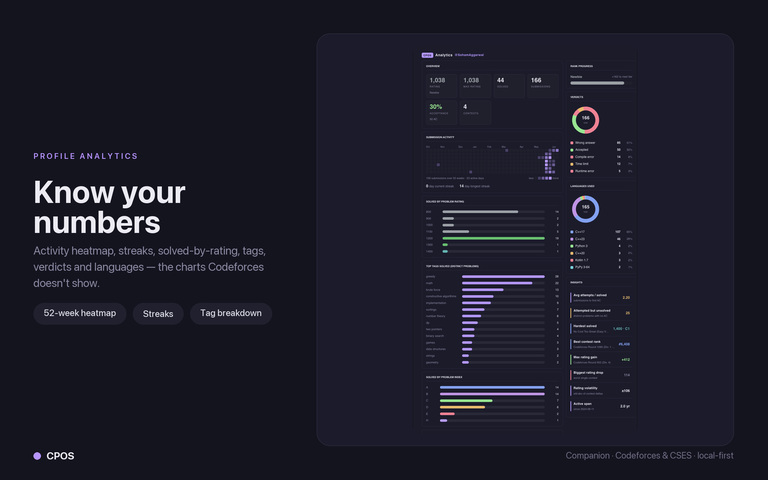
On your profile — proper analytics that Codeforces doesn't give you: activity heatmap, current and longest streak, solved-by-rating and by-index histograms, top tags, and verdict/language breakdowns.
Head-to-head compare (VS) — add other handles and line everyone up side by side, with a rating-history overlay. (Great for arguing with your friends.)

On standings — rating-change predictions, built in (Carrot-style), plus colorize-by-language and a friends-only filter.
A cleaner Codeforces — optional site themes and a flat "Modernize" restyle, with solve-status row coloring and hide-solved on the problemset.

...and a focus mode (hide the right rail, expand the statement), a deterministic daily problem with a streak, a tag-hider / training mode, similar-problem links, one-click sample copy, a per-problem timer, favorites, and inline notes.
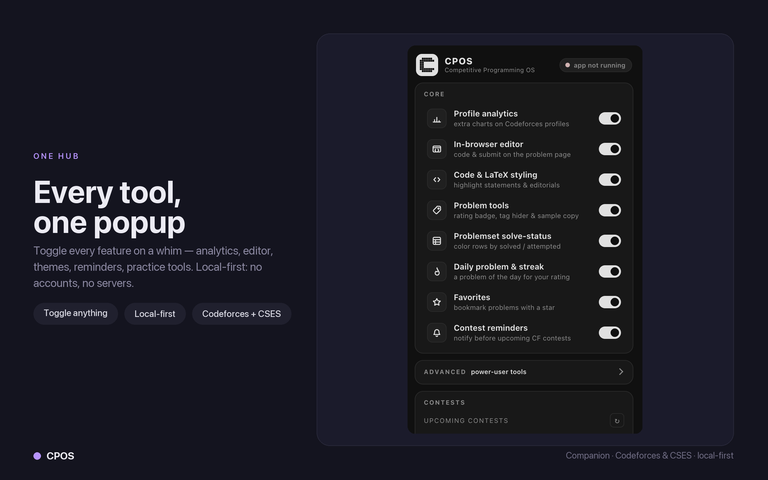
Two things that matter: every single one of these toggles on/off individually from the popup, and all of it is read-only — public Codeforces API plus localhost, nothing leaves your machine.
2. VS Code: it captures and submits like CPH — but it also shows you the problem
The VS Code panel does the CPH things: auto-creates the solution file, runs every sample locally with AC / WA / TLE / RE per test and a diff on failures, 13 languages, and submit.
The difference: the problem statement renders right inside the editor, with MathJax, in its own tab next to your code. No flipping back to a browser tab to re-read the constraints. CPH doesn't do this; it's the single thing I missed most before building it.

It also highlights grouped multi-test samples — hover an input block and the matching output block lights up, so you can tell which output belongs to which input.

3. A terminal cockpit for the stuff no tool touched
This one didn't exist anywhere, so I built it: a full TUI — think lazygit, but for competitive programming. You launch cpos and it becomes your session: browse problems, sync your rating, track contests, and — the part I use most — get told what to do next.

Recommendations that are actually about you. It looks only at unsolved problems near your level and scores them by your weakest tags (a topic you fail 100% of the time outweighs one you're half-comfortable with), boosts problems you started and didn't finish, fits the rating to about +100 above you, then diversifies the list so you don't get fifteen identical DP problems in a row.
A "get me to rating X" planner. Tell the Target tab "I want to be Expert (1600)" and it gives you a readiness %, every prerequisite topic labelled Ready / Developing / Gap / Untouched against a 33-topic curriculum, and an ordered, rung-by-rung plan (Base -> Build -> Push -> Target) of unsolved problems to get there. Press Enter on a step to start solving it.

If you live in vim / neovim / helix, the terminal app steps out of the way to launch your editor and restores itself when you're done.
"Isn't auto-submit going to get me banned?" (No.)
Fair question for any tool that submits for you, so directly: CPOS never sends your code to Codeforces over HTTP, and it never sees your password or session cookie.
It does what you do — it opens the real submit page in your real, logged-in tab, fills the form, and clicks the button. It's automating the copy-paste you already did by hand; it is not solving anything for you.
The honest flip side: because it drives the real page, it depends on the Codeforces DOM staying roughly stable, and it can break for a bit when the site changes. Keeping up with that is on the maintenance list.
What it does not do (yet)
You'll find these in the first five minutes anyway, so:
- Only Codeforces and CSES. No AtCoder or CodeChef yet. (Competitive Companion supports 50+ judges; CPOS goes deep on two instead of shallow on many.)
- It can't read your verdict back yet — after you submit, you still glance at the judge for AC/WA.
- No dedicated contest mode yet (per-problem timers, focused workflow) — planned.
- Firefox isn't on AMO yet — source / self-install for now; Chrome / Edge / Brave are on the Web Store.
- One known bug: the VS Code runner's timeout kills the shell but not always the child process, so a TLE'd program can keep running and need a manual kill (mostly on Windows). Documented, being fixed.
It's a young project, built and maintained by one person, so things will be rough in places. Bug reports are genuinely welcome.
Free, open-source, and 100% on your machine
- Free. MIT. No paid tier, no "pro" features, no accounts, no ads, ever.
- Local-first — the apps talk only over
127.0.0.1. There is no CPOS server; nothing about your solving leaves your computer. - Open source, so you don't have to take my word for any of it: github.com/Soham109/cpos
I'm not selling anything. I built this because I wanted it to exist for my own solving, and it's only worth building if it's free for everyone. If it ever saves you time, a star or a clear bug report is more than enough.
Install
Browser companion (start here — it's the required piece): Chrome / Edge / Brave, or the Firefox source install in the repo.
VS Code extension: Marketplace.
Terminal app:
# macOS / Linux
brew tap Soham109/cpos https://github.com/Soham109/cpos
brew install cpos
cpos
# Windows
scoop bucket add cpos https://github.com/Soham109/cpos
scoop install cpos
cpos
Install all three for the full loop; the browser companion is the one piece you can't skip.
Roast it, and tell me what to build next
That's CPOS. An earlier, much rougher version got a surprisingly kind reception when I first shared it — that's the only reason I bothered to finish it properly, so thank you for that.
If you try it, I want to hear where it breaks, what feels clunky, and what's missing. Drop it here, open an issue, or come yell at me on Discord. Two questions I'd love answers to:
- Which judge should come after Codeforces / CSES — AtCoder or CodeChef?
- If you use vim / neovim for CP, is the terminal app usable for you, or am I missing something obvious?
Thanks for reading. Now go solve something.


this is ai slop
this is everything wrong with this community. Had it been a CM+ or even Expert authored, everyone would be upvoting, promoting, generating fake pr bullshit (ie, without ever testing the product) cos yeah someone who's not a newbie/pupil built a "useful" tool and is approved due to their rating regardless of whether they used ai or not, lol. What's even more ridiculous is that, based on op's level, a sane person would believe it's even better op built with AI to help build a better sys for the majority who have a higher rating than him/her/it/etc.
Moreover, for those who think this is "noise" under the recent actions tab, why don't you leave as is 2 secs after you think it's crap and not downvote so those who it might be useful too don't just think it's a bad product or so.
Conclusively, I feel there's this "stupid" egomaniacal non-scientific based opinion in this community that believes opinions/suggestions/comments from lower-rated individuals (esp newbies) are generally dumb and not worth the time of the masses even without critical analysis of the op's opinion on the said matter. Heck, everyone was once a newbie or even worse, unrated! For op's motivation and wasted effort sake, at least evaluate the product, provide suggestions, or indicate there are already existing solutions. Else, just leave the post as is and not downvote/pass-useless-comment.
tbfh, i don't care about the stupid no. of downvotes i get on this. Yeah, fill your egos by hitting that downvote button. Just wanted to get something off my chest and I'm very glad and at peace with myself for doing exactly that! Thanks for reading
Ngl I saw it on Reddit first I don’t even care about rank or whatever… I just saw the descriptions and readme’s and ai design gradients.
I cannot explain how motivating this comment was. I genuinely wanted to contribute to the community because I found this gap. I just like making tools. I got a lot of positive reviews on reddit (at 260 users now), so thought of posting it here.
I had no intentions of calling some tool "bad", I was just trying to create something that just does everything any other tool would do, plus a lot more.
To be honest, I would not have even minded these amount of downvotes if I was charging any money for it/ asking money for it. I fact, The only place I ever mentioned even a "sponsor" was at the end of the reddit post.
But yeah, genuinely, this one comment is worth a thousand upvotes for me. Thanks bud!
+1 bro... one principle I stick with is that, "don't fkn try to impress anyone, impress yourself!". It can be your 1 fact-based opinion vs 10^100 ignorant others and that's what greats like Galileo stood by.
You identified a gap, fixed that gap, helped yourself and others with it, felt fulfilled, and did your part in pushing the community forward! Same can't be said for others; end of story! Kudos to you bro!
hey buddy, great product ;)
This is the best extension I've ever seen. I didn't install the VSCode extension yet, but I will try it in the future. One feedback is, I don't really like the mordensize site option. The spacing is quite odd for me, but I think that different people have different taste.
I'm glad you like it! Yes, im still working on the mordenize feature!
bruh. I'm a pupil :)
lol, check the rating option of problem of the day on the extension, you can edit it!