


Hey everyone!
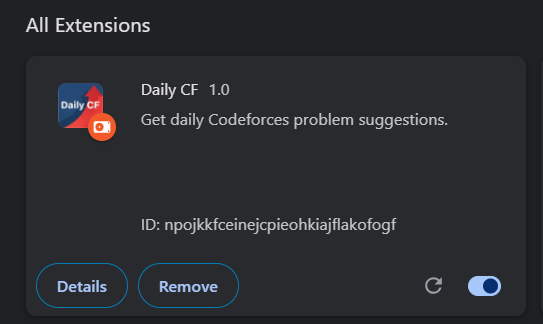
I’m excited to share something I’ve been working on — a Chrome extension called Daily CF. It’s built to make your Codeforces practice more focused, consistent, and effortless by recommending daily personalized problems right inside the Codeforces interface.
What is Daily CF?
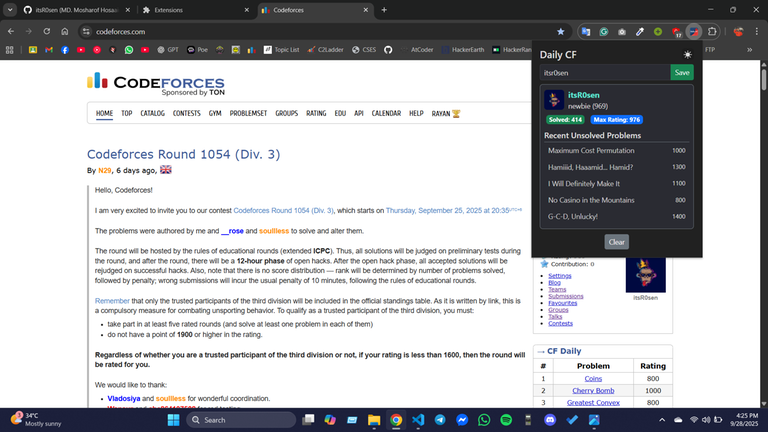
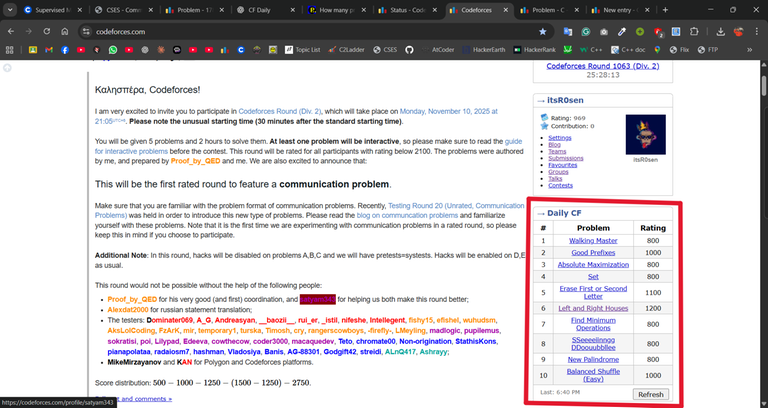
Daily CF is a minimal, integrated extension that adds a new section named “→ CF Daily” to your Codeforces sidebar. Every day, it suggests a small set of problems tailored to your current rating and problem history — so you can start solving instantly without wasting time deciding what to do next.
Key Features
Daily Personalized Problem Set Each day, Daily CF selects a fresh batch of unsolved problems near your current rating range using the Codeforces API. You can also refresh manually anytime with the “Find” button.
24-Hour Smart Caching Fetched problems are saved locally for 24 hours. When the date changes, the extension automatically refreshes the problem list — ensuring you get a new set every day.
Manual Refresh & Timestamp
You can manually update your list anytime using the refresh button. A small timestamp (e.g., “Last: 2:05 PM”) is shown beside the title, so you always know when your problems were last generated.
Seamless Integration
The table blends naturally into the Codeforces UI — matching its fonts, colors, and layout — making it look like an official built-in feature rather than an external add-on.
How It Works
- content.js runs on your Codeforces homepage and injects the “CF Daily” problem table.
- It fetches problems using the official Codeforces REST API.
- watcher.js runs on your submissions pages, detects accepted problems, and updates the stored data accordingly.
- Problems are refreshed automatically once per day or manually upon request.
Why I Built This
As a regular problem solver, I often spend more time choosing problems than solving them. Daily CF removes that friction — it ensures that every time I open Codeforces, I’m just one click away from solving something new and meaningful.
Feedback and Future Plans
I’d love to hear your thoughts and feedback — what works well, and what could be improved. If enough people find it useful, I plan to publish Daily CF officially on the Chrome Web Store and continue improving it with new features.
Final Words
Daily CF is not just another tool — it’s a small step toward building a disciplined practice routine. No setup, no searching, just progress. Happy coding, and see you on the leaderboard!
Here is the GitHub Repository. Do check out!
— itsR0sen


Auto comment: topic has been updated by itsR0sen (previous revision, new revision, compare).
is it in the chrome extension store? I did not find it out
It's not uploaded in Chrome Store yet, you have to download the GitHub Repo as ZIP file then manually install in Chrome.
I'm planning to upload it ASAP.
then u should have a proper readme file for it where the proper instructions will be provided
Thanks for the Concern, I'm adding that.
Instructions have been added. Thanks for your "Supportive Spirit".
Looks very useful. Will wait for you to add to Chrome Store.
still not added on chrome extension store ?
Daily CF – Chrome Extension
Repository: Daily CF on GitHub Author: itsR0sen
Overview
Daily CF is a Chrome extension developed to enhance the problem-solving workflow on the Codeforces platform. It automatically suggests a new problem each day based on the user’s history and rating range, presenting it directly in the Codeforces interface. This effectively removes the need to decide what to solve each day and streamlines practice into a quick, habitual step.
Key Features
Project Structure (as per repository)
Manual Installation Guide (Chrome)
Follow these detailed steps to install Daily CF manually from the GitHub source.
Step 1: Download the Extension Files
Documents/DailyCF).manifest.jsonat its root.Step 2: Access Chrome’s Extensions Page
In the address bar, enter:
Press Enter to navigate to the extensions management page.
Step 3: Enable Developer Mode
Step 4: Load the Unpacked Extension
manifest.json).Step 5: Verify Installation
icons/folder) should appear.Step 6: Watch Visual Tutorial (Optional)
For a clear, step-by-step installation walkthrough, view the video tutorial at: Click this for Youtube Video
Usage Instructions
Development Notes
chrome://extensions/and click the Reload icon beside Daily CF to apply updates."matches"field undercontent_scriptsinmanifest.json.content.jsandwatcher.js.Future Enhancements
Planned enhancements include:
License
This project is provided under an open-source license for educational and personal usage. You may modify and redistribute the extension provided that you credit the original author: itsR0sen
Auto comment: topic has been updated by itsR0sen (previous revision, new revision, compare).
now, just make an extension that fixes the ui. its absolute dog water
It is very useful. Thx for this extension
Thanks a lot.
well done bro
Thank you.
Auto comment: topic has been updated by itsR0sen (previous revision, new revision, compare).
Good job!
why is it not available on edge???
It is very useful. Thank you for this extension! I really appreciate your effort.
Nice work Rosen!