


I am using CP Editor on my MacBook M2 pro. I have installed homebrew for GCC. However, I am not able to fix the issue with the bits/stdc++.h header. I have tried so many ways so that I can include it, but failed. I am getting these errors on CP Editor. Can anybody help? Thanks in advance.
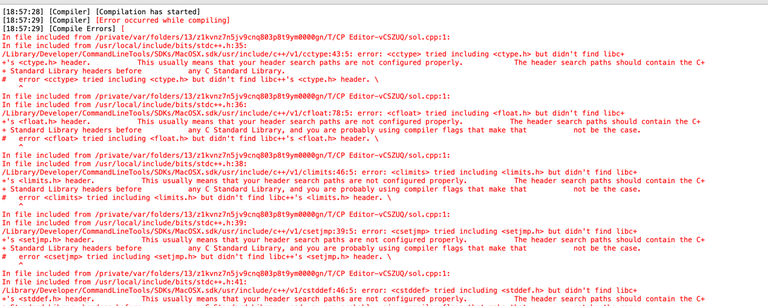


Try to use #include<bits/stdc++.h> line in VS code
Can you check if you have
bits/directory or not in compiler starting directory (folder)?If not then you can checkout the methods mentioned in this blog.
try adding #define _GLIBCXX_FILESYSTEM before #include<bits/stdc++.h>
This is a GCC-only extension, are you sure you have GCC properly installed and setup?
Macbooks by default fool you by associating g++ with clang.
Run
g++ --versionon the terminal, if you see "Apple clang version ....", it means you are not actually using GCC.I haven't been able to make this work on MacOS as it was getting too tedious, advice from seasoned MacOS users here is much appreciated.
A good idea is to download Homebrew, a package manager for MacOS first. Then, it's as simple as
brew install gccin the command line, and setting up cp-editor to use the commandg++-13(or whatever version you want) instead ofg++, which is an alias for clang for some reason.I had the same issue with my macbook. mac uses clang compiler which doesn't have bits/stdc++.h header file. you have to install gnu compiler than you have to run this command on the terminal ln -s gcc-11 gcc and ln -s g++-11 g++
you can watch this video if you face any further problem https://www.youtube.com/watch?v=wY24ehH6mC0