Hi Codeforces,
I would like to share XCPC Workstation, an open-source, local-first workstation built with Rust and Typst for competitive programmers and problem setters. It ships as a desktop app and CLI for Linux and Windows (there are no technical blockers on macOS—prebuilt binaries are simply not distributed yet due to the lack of an Apple Developer account).
It brings together a training dashboard, verifiable algorithm snippets & Team Reference Document (TRD) typesetting, a plain-text problem library, local problem building and strict verification, Typst-based statement typesetting, contest assembly & multi-platform package export, a plugin-powered utilities hub, and first-class AI Agent support (CLI / MCP)—all inside a clean, restrained UI.
- GitHub Repository: lihaoze123/xcpc-workstation
- Downloads (Windows / Linux): GitHub Releases
- Documentation: Online Docs (EN)
- Official Plugin Registry: lihaoze123/xcpc-plugins
- License: Apache-2.0
Note: This post was polished with AI assistance.
1. Training Dashboard
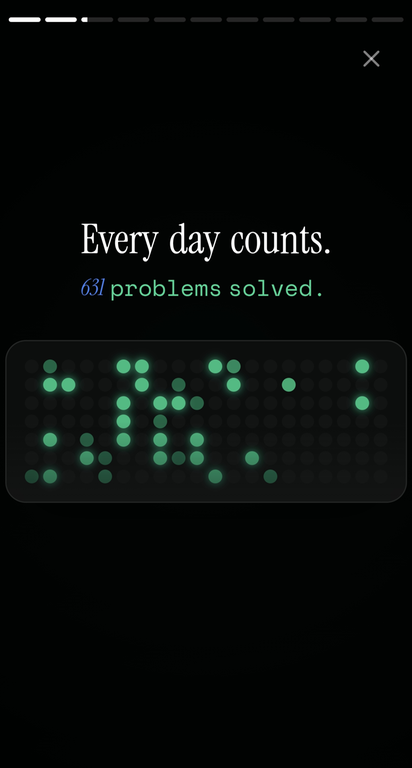
XCPC Workstation includes a multi-platform training dashboard with built-in sync for Codeforces and AtCoder (extensible to other OJs via plugins), alongside local practice and upsolving logs.
It provides a GitHub-style activity heatmap, multi-platform rating curves, difficulty progression trends (P75 / P90), problem distributions by rating and tag, an upcoming contest calendar, and submission search to help you pinpoint weak areas after contests.

2. Verifiable Algorithm Snippets & Team Reference Document (TRD)
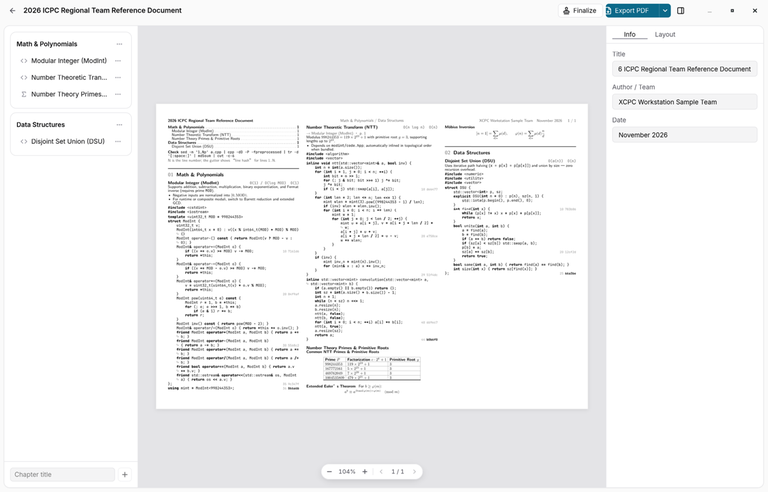
Keep your C++ algorithm snippets in one directory alongside optional notes, declaring dependencies between snippets with standard #include directives. When submitting, xcpc bundle expands all dependencies into a single self-contained .cpp file.
To ensure every snippet in your printed notebook actually works, the workstation can automatically compile and test snippets against local samples, problems in your library, or cached Library Checker test data. For printing, it ships with a KACTL-style 3-column landscape A4 layout and a standard book layout, complete with cumulative per-line verification hashes so you can catch typos while typing long code during a contest. Finalized TRDs can also be frozen for archival.
3. Open-Directory Problem Library & Git Collaboration
Every problem, editorial, config, and source file lives in plain text (Markdown, TOML, C++) inside an ordinary folder—no proprietary database. You can edit files with your favorite editor, and problem-setting teams can collaborate directly via Git branches, pull requests, and code reviews while the desktop app picks up external edits automatically.
The library view supports custom groups, contest filters, batch actions, quick navigation (Ctrl+K), instant statement previews, and one-click import of Polygon single-problem or full-contest ZIP packages (automatically converting LaTeX statements to Markdown while preserving interactors, multi-run settings, and subtasks).

4. Problem Building & Strict Verification
Each problem supports a complete local loop: generate tests -> verify solutions -> stress test -> strict sign-off. It uses your local g++ / clang++, bundles the latest testlib.h and standard checkers, and only rebuilds or regenerates what changed so iteration stays fast.
Beyond traditional tasks, it has full support for trickier problem types:
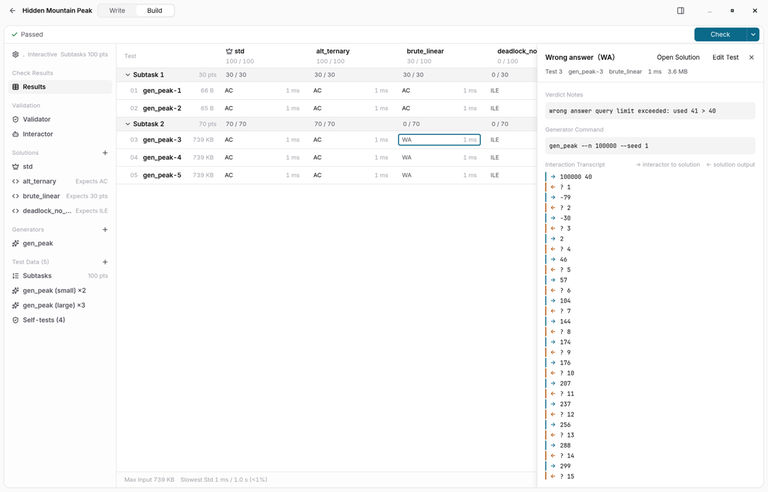
- Interactive & Multi-Run Communication Problems: Records bidirectional interaction transcripts, accurately distinguishes CPU
TLEfrom missing-flush deadlocks (ILE), and supports both direct interactor verdicts and two-stage checker judging. - OI Subtasks & Partial Scoring: Supports
min(bundled) andsumscoring, subtask dependencies,quitppartial scores, per-group validation (validator --group <id>), and expected-score assertions for partial solutions.
To prevent broken problems in real contests, everyday debugging is separated from strict verification (--strict): a problem is only marked verified after passing validator/checker self-tests, full test validation, time-limit headroom checks for the main solution, and all expected verdicts for wrong/partial solutions. Bounded stress testing is also built in and automatically saves counterexamples.
5. Typst-Powered Statement Typesetting
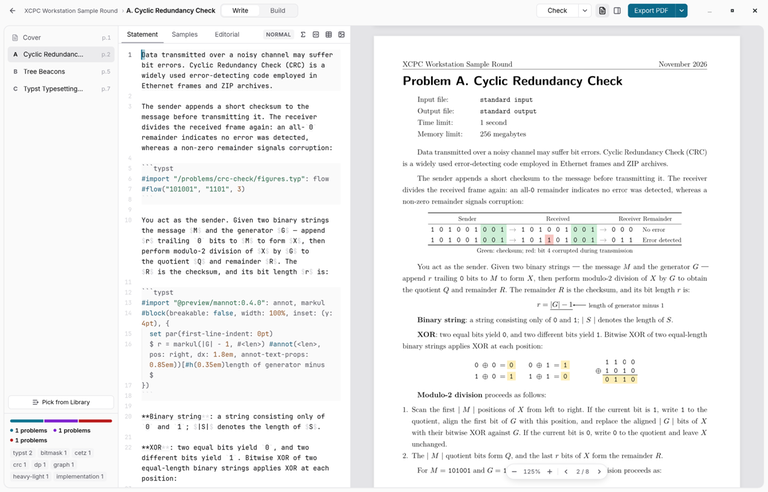
Statements and editorials are written in Markdown + LaTeX math, with sample input/output pulled directly from samples/ rather than duplicated in text. The app embeds the Typst engine and required fonts—no multi-gigabyte TeX Live installation needed to produce print-ready PDFs.
Markdown and math are converted to Typst via structured translation rather than brittle regex replacement, so nested formulas, escapes, and code blocks stay intact, and diagnostics map back to exact line numbers in the source file. On the preview side, tiled rendering redraws only changed regions, keeping live preview at millisecond latency even on full contest booklets.
Three templates are included out of the box: olymp-classic (aligned with the classic olymp.sty ICPC layout), cnoi-classic (CCF CSP/NOI style), and minimal, with support for custom Typst macros.
6. Contest Assembly, Freezing & Package Export
Contests reference problems directly from your library without copying files—fix a typo or sample in a problem, and the contest booklet and editorial PDFs update automatically. Once finalized, Freeze snapshots all source files, active templates, and compiled PDFs into a read-only archive so the exact published contest can always be reproduced later.
For judge deployment, you can export minimal DOMjudge and Hydro ZIP packages in one click (stripping internal solutions/generators, embedding the compiled statement PDF, and generating Hydro subtask config.yaml). Custom import/export formats can also be added through the plugin system.
7. Plugin System & Utilities
XCPC Workstation provides a plugin system covering custom OJ data sources, package importers/exporters, and standalone interactive utilities. Plugins run in isolated environments and require explicit user approval before accessing network domains, files, or credentials.
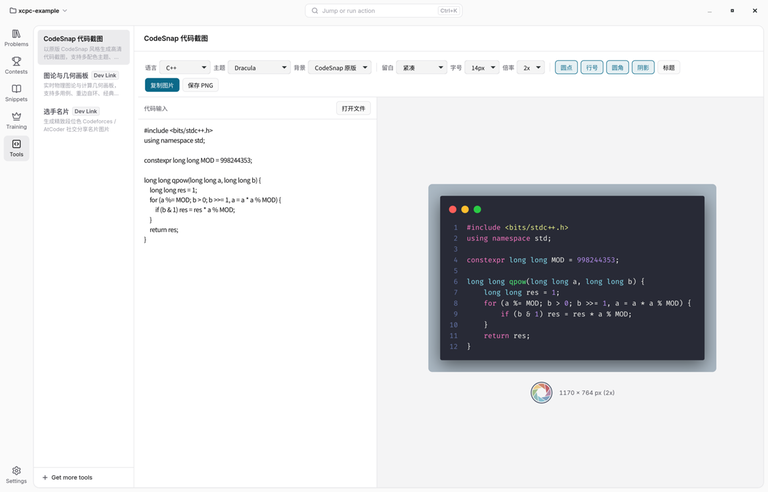
The official plugin registry (lihaoze123/xcpc-plugins) already offers several handy utilities—including a Graph & Geometry Editor, CodeSnap, Rating Cards, Number Theory & Bitwise Workbench, String Algorithm Debugger, and Complexity & Memory Estimator—all installable in one click. Plugin authors can build with Vite using the official SDK and distribute plugins directly via a GitHub repository + Release index.json, with no dedicated store server required.
8. CLI & AI Agent Support (MCP & Skills)
The xcpc CLI and stdio xcpc mcp server share the exact same core as the desktop app. Connecting Claude Code, Codex, Cursor, or any MCP-compatible agent lets it search the library, edit statements, write generators, run stress tests, execute strict verification, verify snippets, and render PDFs—with changes reflected live in the desktop UI.
Safety is enforced at the core level: --read-only mode is supported, all writes stay strictly within the workspace, and frozen contests and TRDs are strictly read-only—unfreezing requires manual confirmation in the GUI or CLI and is never exposed to MCP.
Rigorous AI-assisted problem setting does not rely on trusting the model to be careful; it is enforced by two hard layers:
- Official Workflow Skills: Running
xcpc init --with-skillsinstalls official problem-setting skills that enforce a disciplined workflow (statement, validator, stress testing, adversarial data, visual review) and explicitly forbid shortcuts such as loosening time limits, deleting failing tests, or writing dummy validators. - Engine-Enforced Verification Gates: Final sign-off is adjudicated independently by the local judge engine—validators and custom checkers must pass positive/negative self-tests, all tests must pass validation, the main solution must finish within 50% of the time limit, and all wrong/partial solutions must hit their expected verdicts. Agents can also run stress tests, ASan/UBSan checks, and page-by-page PNG rendering to visually inspect formulas and layout.
Quick Start
- Download the installer or archive for your platform from GitHub Releases (Windows per-user installer / portable ZIP; Linux
.deb, Arch.pkg.tar.zst, AppImage,.tar.gz; plus standalone CLI packages). - Launch the app and click "Open Example" to unpack a complete demo workspace with sample contests, traditional/interactive/communication/OI subtask problems, and templates.
- Or try the full pipeline directly from the terminal:
# Initialize the built-in English example workspace with official AI Agent skills
xcpc init --example --lang en --with-skills ./my-xcpc

# Build contest statement and editorial PDFs
xcpc -w ./my-xcpc build contest welcome-round
xcpc -w ./my-xcpc build contest welcome-round --editorial

# Run strict verification on the 4 built-in example problems
for p in interval-sum weighted-walk hidden-peak secret-relay; do
  xcpc -w ./my-xcpc package build "$p" --strict
done

# Export a full contest to DOMjudge / Hydro ZIP packages
xcpc -w ./my-xcpc export domjudge contest oi-mock
xcpc -w ./my-xcpc export hydro contest oi-mock
Contributing & Feedback
XCPC Workstation is open-source under Apache-2.0 and actively evolving. Contributions and feedback are welcome:
- Report bugs, suggest features, or open pull requests on GitHub;
- Build new OJ sync plugins, package importers/exporters, or CP utilities with the official SDK and Vite.