Hi Codeforces!
I am AdhamAfterMidnight, and together with OmarAfterMidnight we have been working on a project called VoidHub.
VoidHub is a real-time 1v1 competitive programming platform where you can invite a friend, choose a mode, solve problems from Codeforces, Online Judge, and HackerRank, and compete inside a shared match room with live submissions, penalties, timers, and results.
We already wrote a detailed post explaining the main idea, the supported modes, problem sources, match rooms, profiles, and the first version of the platform here:
https://codeforces.me/blog/entry/154856
In this post, I mainly want to share what we added after that.
What's new
Since the first post, we shipped a few things based on how the duels actually felt to play:
Custom Rooms
You can now create your own room instead of only using the preset modes.
The creator builds the problem set manually by adding problem links, chooses the room settings, then shares a private room link. Other users can request to join, and the creator decides who gets in before the match starts.
Custom rooms currently support:
- Custom timer: set the match length in minutes.
- Hide tags: hide problem tags so nobody gets hints from them.
- Mixed sources: combine problems from different judges in the same room.
- Scoreboard freeze: freeze the scoreboard for the last part of the match, similar to a real contest finish.
- Penalty presets: choose the penalty rules for the room.
- Problem order: keep problems in the order you added them, or reorder them.
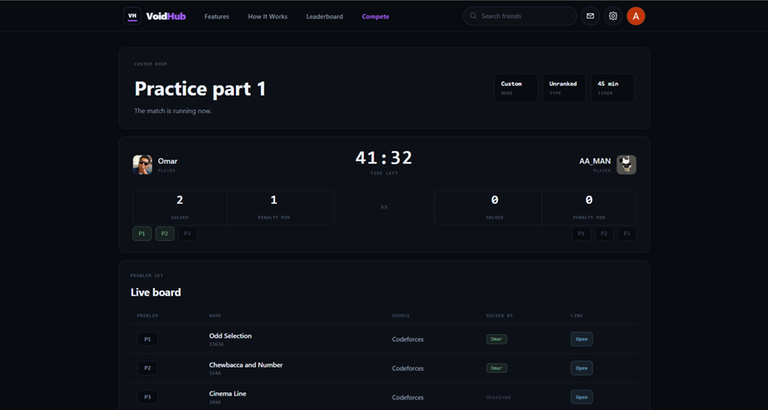
The creator also gets a live viewer page while the custom match is running. It shows the timer, both players, solved count, penalties, and the live problem board, so the room creator can follow the match without needing to participate.
Shareable match results
After a match ends, you can now turn the result into a clean image.
From the result screen, you can share it directly or download it as a PNG, which makes it easier to post the result, send it to friends, or keep it as a small record of the duel.

Quick Rematch
After a match ends, there is now a Rematch button.
One click sends a rematch invite to your opponent, so you can start the next duel immediately without going back and setting everything up again.
Chat
We also added chat in two places:
- In-room chat: a chat panel inside the match room, so both players can talk during the duel.
- General chat: direct messages between users outside of matches.
UI improvements
We also cleaned up several parts of the UI, especially the navigation bar, profiles, result pages, and custom room flow.
Why this update matters
The first version was mainly about making 1v1 practice possible.
This update is more about making the platform feel more flexible and closer to how people actually practice:
- sometimes you want random problems
- sometimes you want a fast duel
- sometimes you want to choose the exact problem set
- sometimes you want to host a small private match and watch it live
Custom rooms were built mainly for that.
You can try VoidHub here:
https://voidhub.co
And the original detailed post is here:
https://codeforces.me/blog/entry/154856
As always, feedback, bug reports, and suggestions are very welcome.