


Hello everyone!
I'd like to share with you a helpful extension I have been working on CF Round Filter.
CF Round Filter helps you filter rounds by division (Div 1–4, Educational, Others) and highlight solved or attempted problems so you can focus on contests and problems that match your skill level and track your progress efficiently. 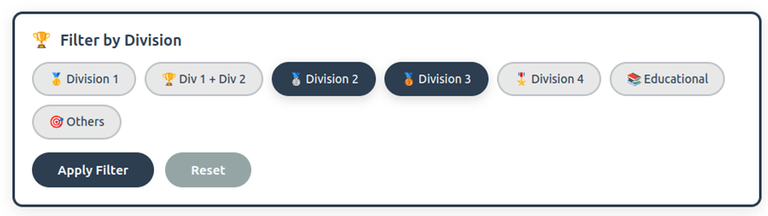

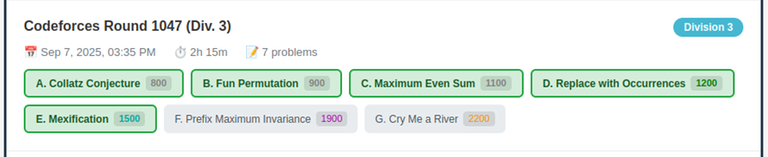
Features :
- Toggle Div 1–4 and Edu rounds in seconds.
- Color-coded problem cards with visible ratings.
- View progress and history for any user.
- Hide solved problems to focus on the next challenge.
Notes :
- Some problems exist in Div1 and Div2 rounds at the same time, they will only appear in the Div1 card.
You can download it here: Chrome
To use it, you need to be on Problemset page
If you find any bugs, have any comments or suggestions please let me know.
Hope you like it and consider sharing it with your friends.


It has a bug where it does not fully displayed all problems in some contests

Hello daukhoi, thanks for your quick response!
You’re absolutely right. The reason you don’t see those other problems is that they appear in a Div1 contest. To access them, you need to filter specifically for Div1 problems.
Thx
There is this contest that got bugged Ascension36

Hello daukhoi, thanks for catching that!
The issue was that certain special Codeforces rounds weren’t included in the global problemset.problems API. This has been fixed, and the update has been submitted to the Chrome Web Store. It will take roughly 24 hours for review before the fix becomes available.
I think this web have done a better job in display: https://cftracker.netlify.app/contests
Hello akane646, thanks for the feedback!
I’ve seen the design on that site and agree it looks really clean. I’ll work on improving the UI.
I think it would be better to redirect to url from the problemset
instead of from the contest
It will make submitting more convenient because you don't have to select the problem
Hello MyBrainGotTLE, thanks for the suggestion !
I’ve updated it so problems now redirect to the problemset URL instead of the contest URL, so submitting is easier and you don’t need to manually select the problem. We just need to wait for the Chrome review to finish, which should take about 24h.